— Features

No-code chatbot builder features, in plain English

What you actually get when you sign up — the flow builder you'll spend most of your time in, the 161 templates that mean you don't start from a blank canvas, the channels you can ship to today and the ones we're building, and the integrations that hand the qualified lead to the tools you already use.

/FEATURES · 7 PILLARS · 161 TEMPLATES

Alma flow-builder canvas showing the Coastal Buyer Qualifier bot — START node, question nodes, conditional branches, an APPROVED branch, and an END node, with a right-side configuration panel

/01 — THE FLOW BUILDER

Drag-and-drop chatbot flow builder canvas

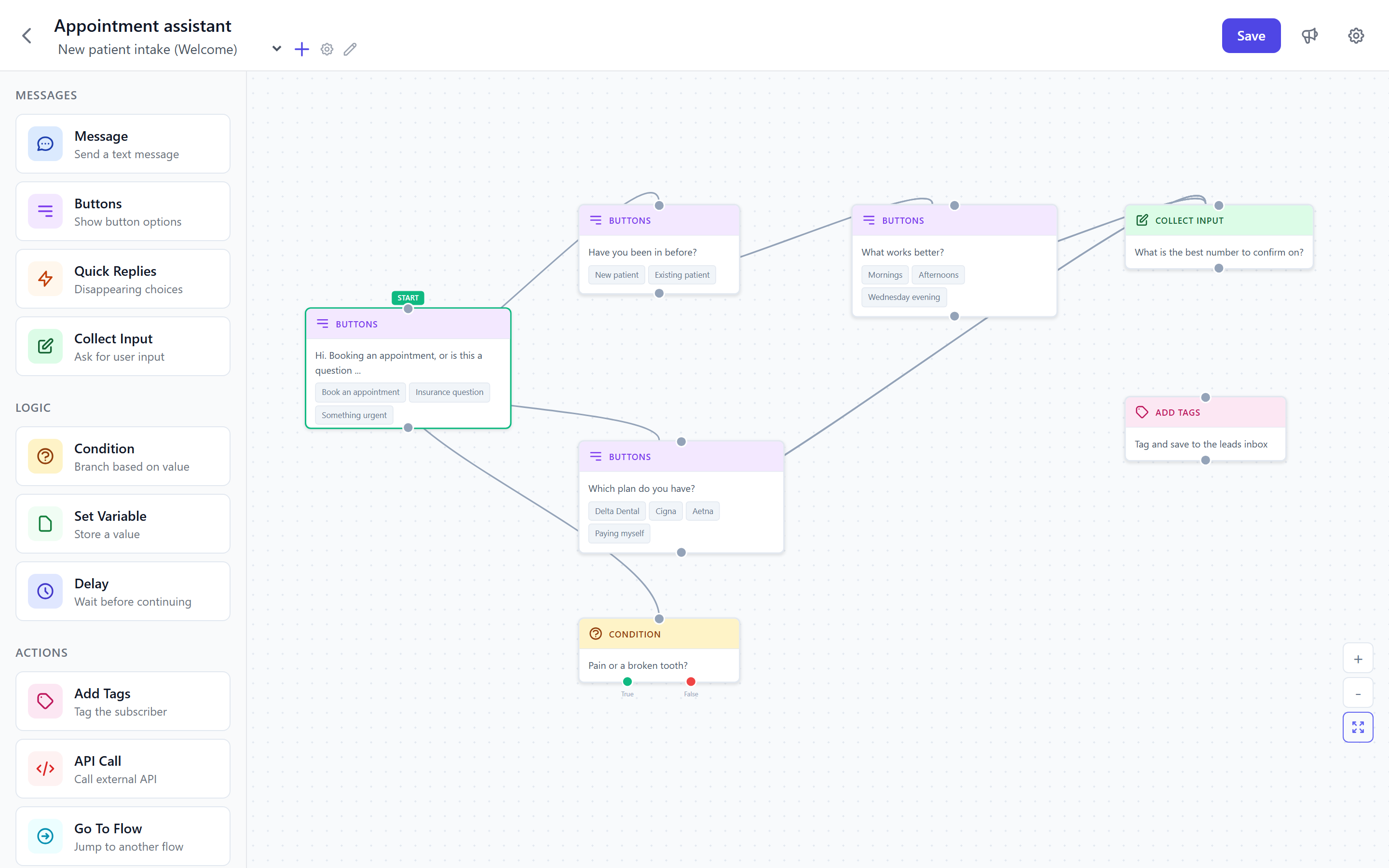
This is the entire authoring surface. Drag a question, draw a connection, set a condition. Each node knows what variables came before it. The right-side config panel lets you edit copy, set required fields, and choose what happens when an answer matches a rule.

  • Vue Flow drag-drop canvas — pan, zoom, snap-to-grid
  • Three node types: question, conditional branch, action
  • Action nodes: send email, push to a CRM, schedule a callback
  • Per-node config panel on the right (live as you type)
  • Variables auto-populate downstream — ask once, reuse anywhere
  • Test mode: run the conversation without saving
  • Templates load as starter graphs — never an empty canvas

Open the canvas and click around.

The flow builder is the single thing most owners touch. 14-day free trial, no card, your first bot live in 30 minutes.

/02 — 161 INDUSTRY TEMPLATES

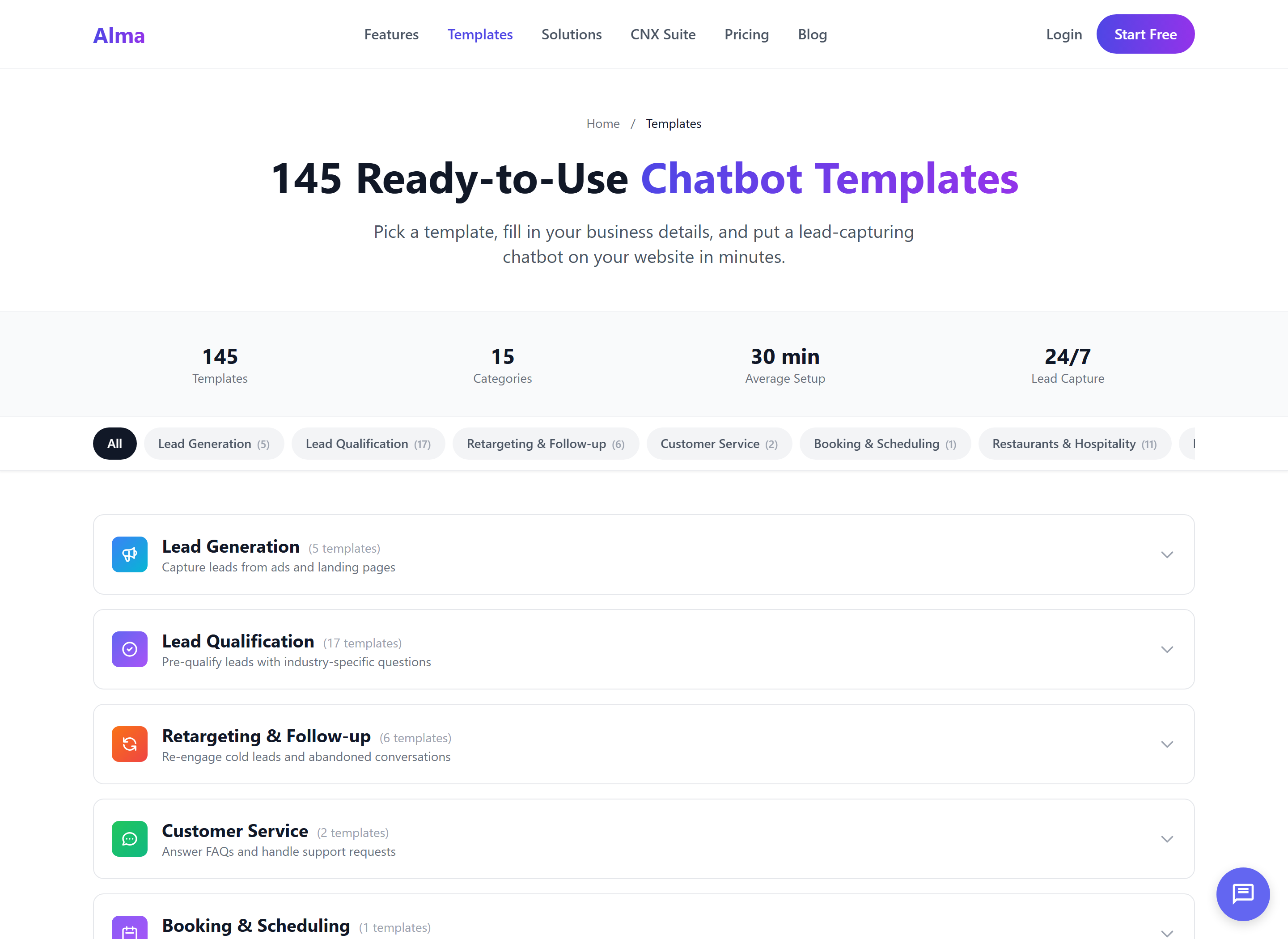
161 industry chatbot templates

Every template is a starter graph written by an operator who's run that exact playbook — buyer qualifiers, intake forms, reservation flows, donor inquiries. Pick one, change the wording to your voice, publish. The whole library is on every paid tier — Starter through Enterprise.

  • 17 categories, 161 templates total
  • Hospitality (12), E-commerce (14), Healthcare (10)
  • Fitness & Wellness (12), Home Services (10), Education (10)
  • Political Campaigns (10), Professional Services (10)
  • Agency Ops (12), Internal Ops (15), Lead Gen (6)
  • Qualification (26), Booking (5), Retargeting (6)
  • Available on every tier — no upcharge for the library
Alma template picker showing 161 industry-specific chatbot templates organized across categories like real estate, healthcare, hospitality, fitness and wellness, political campaigns, and home services
Lead Gen6
Qualification26
Retargeting6
Customer Service2
Booking5
Hospitality12
E-Commerce14
Healthcare10
Home Services10
Fitness & Wellness12
Education10
Professional Services10
Political Campaigns10
Agency Ops12
Internal Ops15
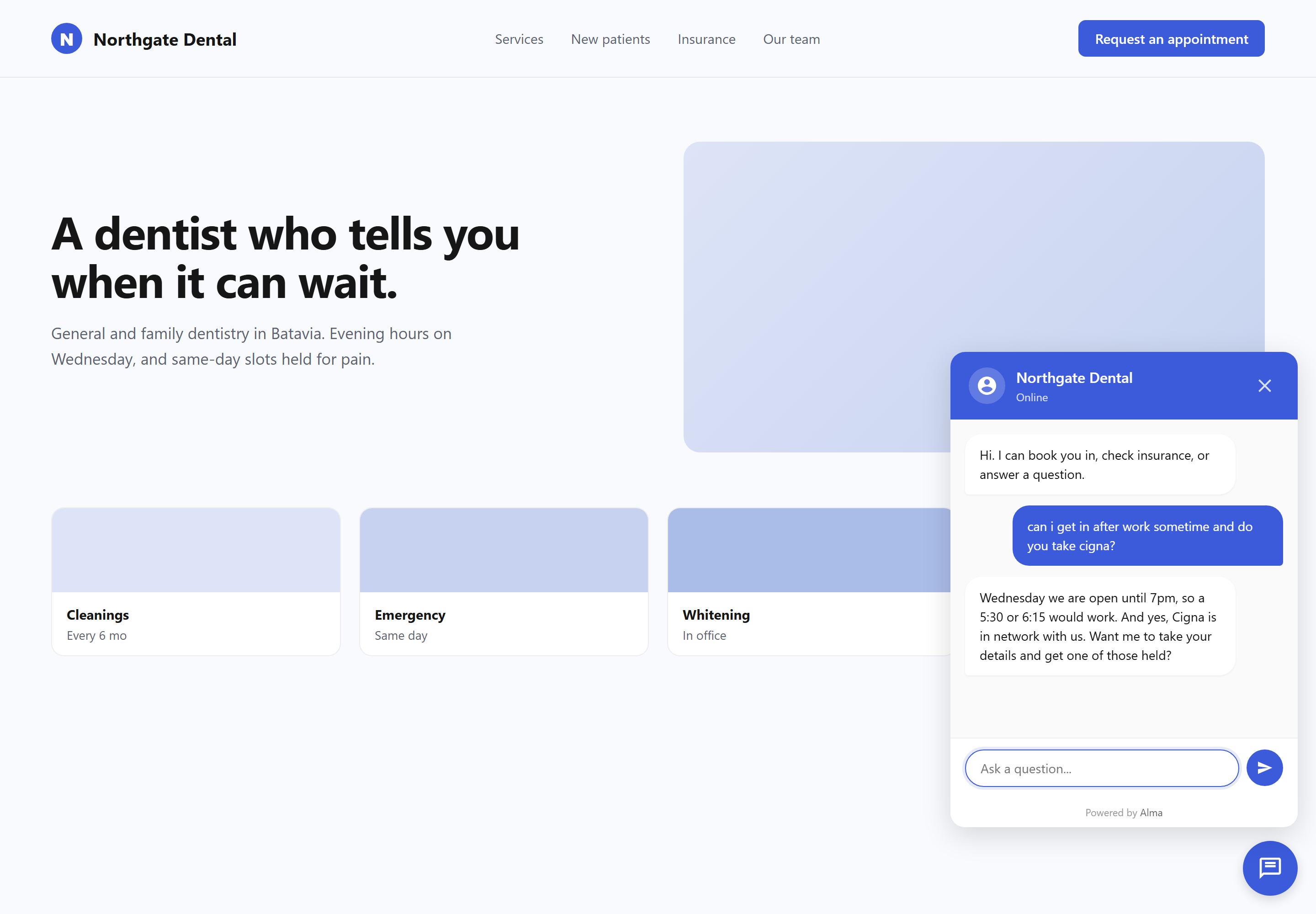
Alma chat widget embedded on a real-looking small business website, showing the conversational lead-capture experience a visitor sees

/03 — CHANNELS

The website today. Messenger and Instagram in active development.

Alma ships to your website on day one — drop one snippet of JavaScript, the widget is live. Facebook Messenger and Instagram DM channels are scaffolded in the codebase and pending Meta review; we are not promising a date and you should not buy Alma for those today. When they ship, the same flow runs across every channel.

  • Website widget — drop-in JS, fully live, one snippet
  • Custom widget colors, position, opener copy, mobile sizing
  • Facebook Messenger in development
  • Instagram DMs in development
  • Same flow runs on every channel we ship
  • Per-channel performance breakdown when more than one is active

Paste the snippet. Watch the first conversation roll in.

The website widget is live the moment the page reloads. No SDK install, no plugin, no Wordpress wrestling.

— Integrations

Chatbot integrations — where the lead goes

The lead doesn't sit in Alma's inbox forever — it gets handed to the tool you already work in. Six handoff destinations, all built in, no Zapier-only workarounds.

SHEETS

Google Sheets

CSV-style row export to a sheet you own. Service-account auth — no fragile password integrations. Good for owners who want a single ledger of every lead and don't want a CRM yet.

ZAPIER

Zapier

Webhook-based — fires new_lead and lead_tagged events. Good when your workflow already runs through Zapier and you want Alma to be one more trigger in a chain you already own.

EMAIL

Email / SMTP

Notifications when a conversation completes, with a hot-lead priority flag for high-intent intents. Good for a solo operator who reads email all day and just needs the alert.

CNX+

CampaignCNX+ SMS

Push the lead into a CampaignCNX+ list and fire an SMS follow-up sequence the moment the conversation ends. Good when you want the text in front of them while their hand is still on the phone.

OS+

CoreCNX

Writes the contact and a timeline event to your unified CRM — the chatbot conversation becomes one row on the customer's history alongside texts, doors knocked, and emails sent.

HOOK

Generic outbound webhooks

Signed webhook to any URL you control. Good for engineering teams who'd rather pipe events into their own stack than use a packaged integration.

/05 — LEAD CAPTURE & HANDOFF

Qualified lead capture and CRM handoff

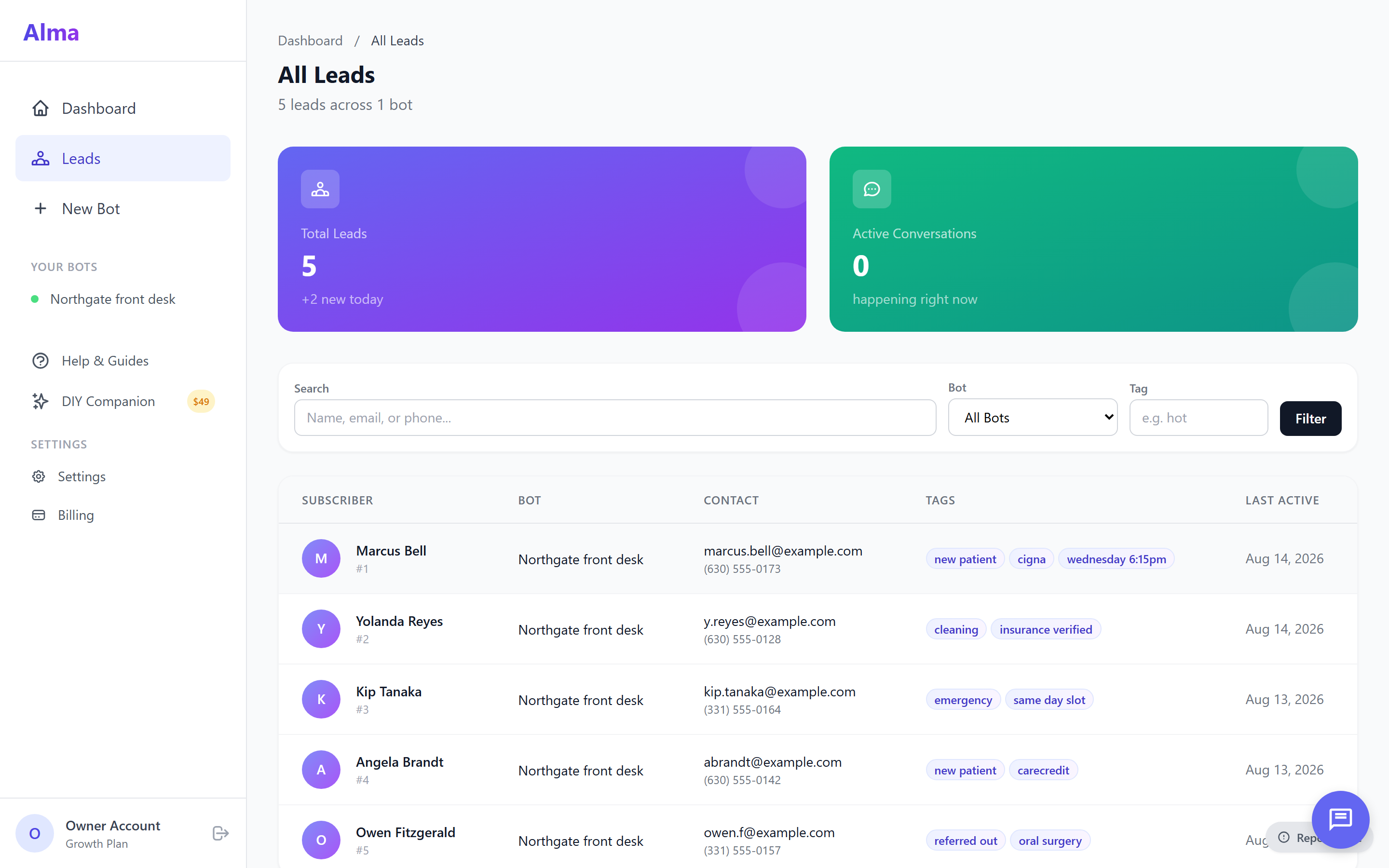
The conversation isn't a transcript dumped on you — it's a lead row with name, phone, intent, and timing already extracted. Notifications fire when the conversation completes; the data goes to the destinations you wired up. Nothing sits in a black box.

  • Qualified-lead row: name, phone, intent, timing
  • Email notification on completion (with hot-lead priority flag)
  • SMS notification on completion (where you've added a number)
  • Push to Google Sheets, Zapier, CampaignCNX+, CoreCNX
  • Live conversation rate stats per bot
  • CSV export from any inbox view
Alma leads inbox showing qualified-lead rows with name, phone, intent, timing, source bot, and hot-lead flags ready for handoff to a CRM

Wire Alma to the tools you already use.

Sheets, Zapier, CampaignCNX+, CoreCNX, your own webhook. The lead lands where you actually work.

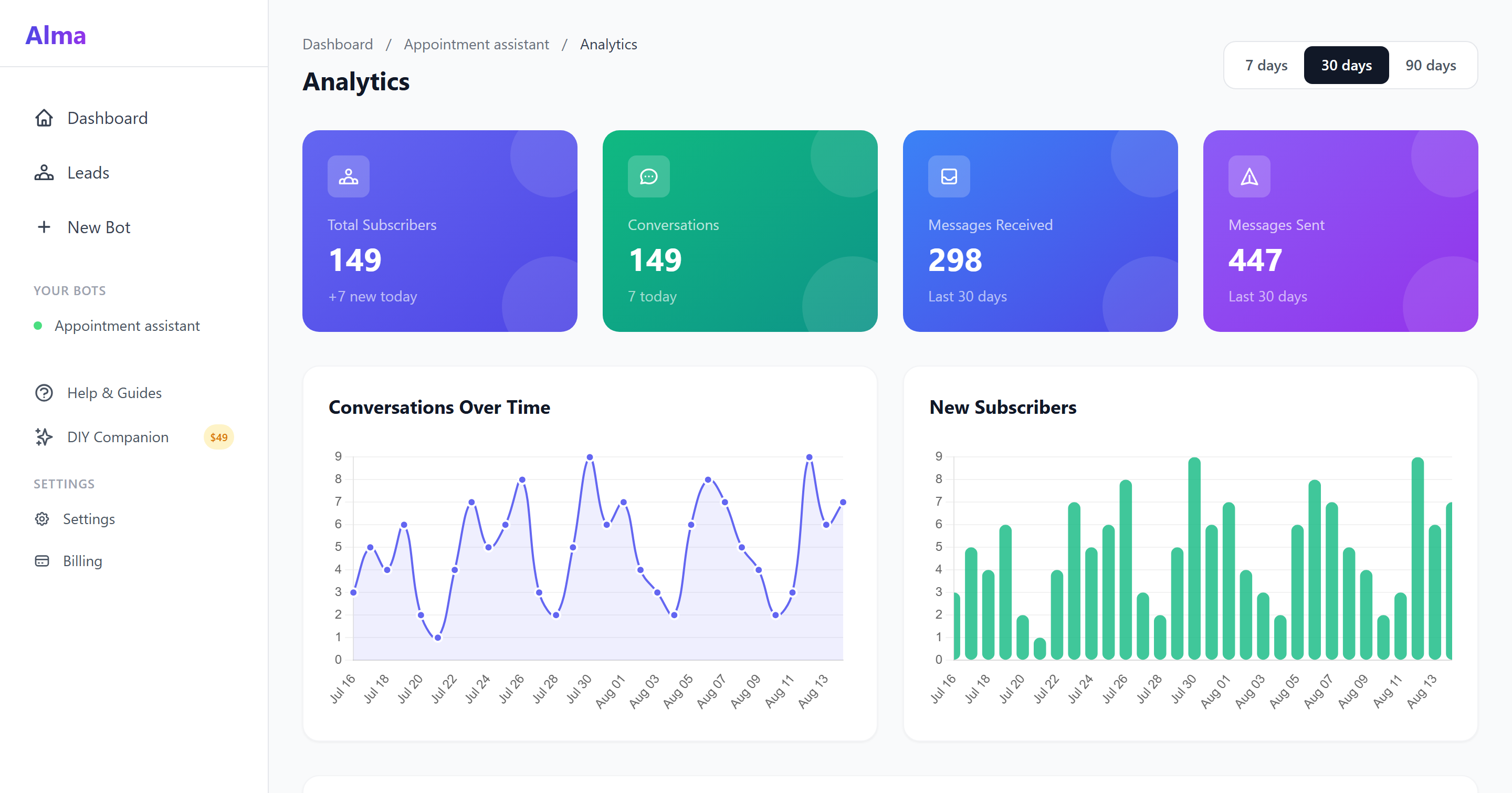
Alma analytics dashboard showing per-bot completion rate, lead volume trend, conversion funnel, top-performing flows, and message-volume over time

/06 — ANALYTICS

Chatbot analytics dashboard — completion rate and funnel

You see completion rate per bot, total lead volume, the funnel (where people drop), and which flows are pulling their weight. If multiple channels are active, the report is source-attributed so you know whether the lead came from the website widget or a channel in development. Growth tier and up

  • Per-bot completion rate
  • Lead volume over time
  • Conversion funnel — drop-off at each step
  • Top-performing flows ranked by qualified-lead conversion
  • Message-volume trends
  • Source-attributed when more than one channel is live

— /07 The agency model

White-label chatbot for agencies — multi-client workspaces

If you're Casey Patel running Bright Loop Agency with five clients on five chatbots, the Agency tier is the shape that fits. Each client lives in a sub-account workspace; data is isolated per workspace; the widget wears your brand, not ours.

/A

Sub-account workspaces

One parent agency at the top, many client orgs underneath. Each workspace has its own bots, its own leads, its own settings. Conversations are isolated per workspace.

/B

White-label

Custom domain, custom branding on the widget. Your client sees your agency's name on the chat experience — Alma stays out of the picture.

/C

REST API

Programmatic workspace creation and template deployment. Spin up a new client account, drop a starter template into it, all from your own onboarding script.

/D

Workspace-scoped billing

Each client workspace bills separately or rolls up to the parent — your call. No accidental cross-workspace data leaks; the data plane is isolated per workspace.

Run five clients, fifty, or one — same product.

Agency tier adds sub-accounts, white-label, and the REST API. Starter and Growth tiers run a single workspace.

— What you get vs. the typical chatbot tool

Alma vs. typical chatbot tools for small business

The typical SaaS chatbot tool is built for a 200-person sales org with a six-figure CRM contract. Alma is built for the four-chair salon and the campaign field office. Here's what shows up differently when you sign up.

Topic
Typical chatbot tool
Alma
Starting point
Empty canvas. "Here are some example flows in the docs."
161 industry templates that load as starter graphs. Pick one, edit copy, publish.
Where the lead goes
Their inbox, with a Zapier-only handoff if you pay extra.
Sheets, Zapier, your CRM, CampaignCNX+ for SMS, CoreCNX for unified timeline. Built in.
Pricing
"Talk to sales." Custom quote. Annual commit.
$29 / $79 / $199 / Enterprise. Listed on the pricing page. 14-day trial, no card.
Who it's for
Mid-market sales teams with a Salesforce admin.
Owner-operators, agencies running multiple clients, and campaign teams.
Channel honesty
"Omnichannel" badges on every channel before any of them work.
Website is live. Messenger and Instagram are in development. We say so.
Growing with you
A point tool. Pull in three more vendors when you outgrow it.
Alma is one piece of the CNX Suite — CampaignCNX+ (SMS), Beacon (field), CoreCNX (CRM) wire in when you need them.

— Start free

Try every no-code chatbot feature free for 14 days

Sign up, browse the 161-template library, drop a flow into your site. The drag-and-drop canvas, the live preview, the conversation log, the lead inbox — all there from minute one. No demo gate, no sales call.

Trial
14 days, no credit card
Setup
30 minutes for most owners
Onboarding
Real person, not a chatbot