Agency tier

Chatbot builder for agencies: every client, one dashboard

The Agency tier is designed for businesses that run chatbots for several clients. You get one login, a separate workspace for each client with its own data, and separate settings for each client's widget, which is the chat window on each client's website. Our team turns on the client workspaces when your account is set up. A REST API (a way for your own software to manage Alma) is included for teams who prefer to set up client bots from code. The plan costs $199/mo and includes 20 active bots, 50,000 subscribers, 100,000 messages, and unlimited team members across the whole agency.

Active bots
20 across all clients
Subscribers
50,000
Messages / mo
100,000

Who runs it

Built for agencies running 5 to 20 client chatbots in real estate, wellness, restaurants, healthcare, home services, and political.

/A · A WORKED EXAMPLE

An afternoon at Bright Loop, a fictional agency we use as an example.

Bright Loop Agency is on the Agency plan and runs Alma chatbots for five small-business clients: a real estate brokerage, a yoga studio, a dental practice, a salon, and an HVAC company. Casey, who runs the agency, logs in once. The first screen shows a summary for the whole agency, such as 961 leads collected this month and $48,250 in potential sales, with the conversation rate for each client and recent activity from every workspace. These figures are illustrative and are not real customer results.

Bright Loop's own Discovery Call Qualifier, which the agency uses to screen its own prospective clients, is in the same dashboard. It uses the same flow builder (the tool for arranging a chatbot's questions) and the same lead delivery that the agency sells to its clients.

  • One login for the whole client list
  • Combined figures across all five client workspaces
  • Detail for each client without switching accounts
  • Bright Loop's own qualifier sits alongside the client bots
  • One bill at month-end, on the agency's card
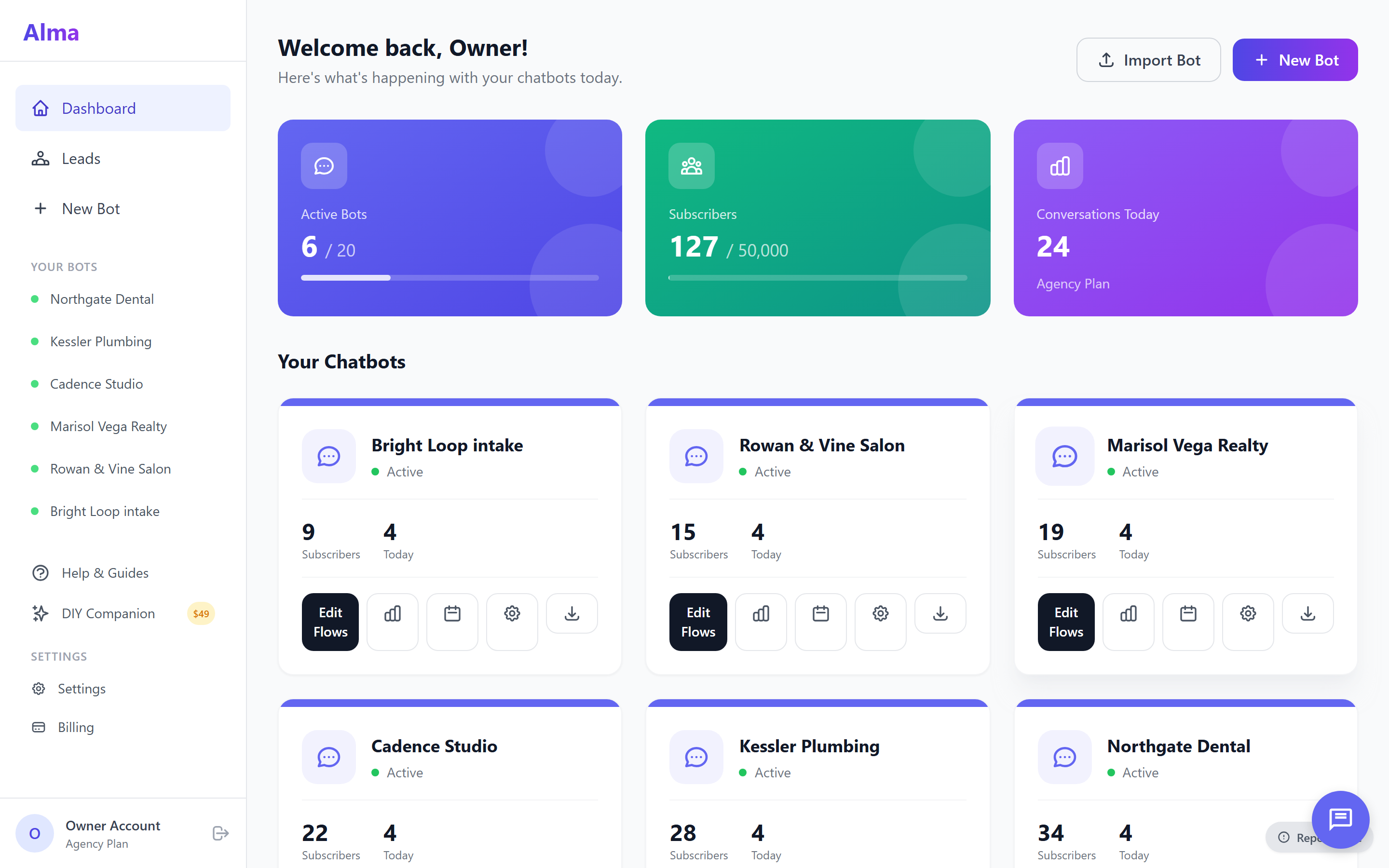
The Alma dashboard on an agency account, showing six client chatbots side by side with each one's subscriber count and conversations today, and the plan's bot allowance at six of twenty.

Bright Loop's client mix

Real estate

Coastal Realty Group

Buyer and seller qualifier on the brokerage site. Jordan Reyes' team receives each lead with the neighborhood, timeline and contact details already collected.

Wellness

Mindful Yoga

Class booker for Riley Cooper's studio. It books the class, collects the phone number, and schedules a reminder 24 hours ahead.

Healthcare

Smile Studio Dental

Appointment booker for Robert Martinez's practice: service select, insurance pre-check, callback scheduling.

Salons & spas

Northshore Salon

Service and stylist match with appointment booking. It collects late-night booking requests that the front desk would otherwise miss.

Home services

Coastal HVAC

Estimate scheduler that asks whether the visitor needs a same-day or a scheduled visit. It collects the address and best phone number before the conversation ends.

Bright Loop · internal

Discovery Call Qualifier

The agency's own intake bot, listed alongside its clients' bots. Emily Rodriguez ($10k to $25k/mo ad budget, growing) came in last week.
Start your agency on the trial. No credit card.

The 14-day trial lets you build and test a chatbot before you choose a plan. Client workspaces and the REST API come with the Agency plan, and our team turns on the workspaces when your account is set up.

/01 · SUB-ACCOUNT WORKSPACES

One login, with a separate workspace for each client.

Client workspaces come with the Agency plan, and our team turns them on when your account is set up. Each client has its own workspace inside your agency account. Conversations, leads, contacts and analytics are kept separate for each workspace. A teammate logged into Coastal Realty's workspace cannot read Mindful Yoga's leads, even by accident. You switch workspaces from the agency menu without logging in again.

If a client wants their own access, you can give them a login for their workspace only. They cannot see the main agency account or your other clients. Most agencies do not use this option. They manage the workspace themselves and pass the new leads to the client.

  • One agency login, switch between client workspaces
  • Conversations, leads, and contacts isolated per workspace
  • Optional client logins scoped to their own workspace only
  • Each workspace starts with the agency's flow library
  • Unlimited team members across all workspaces
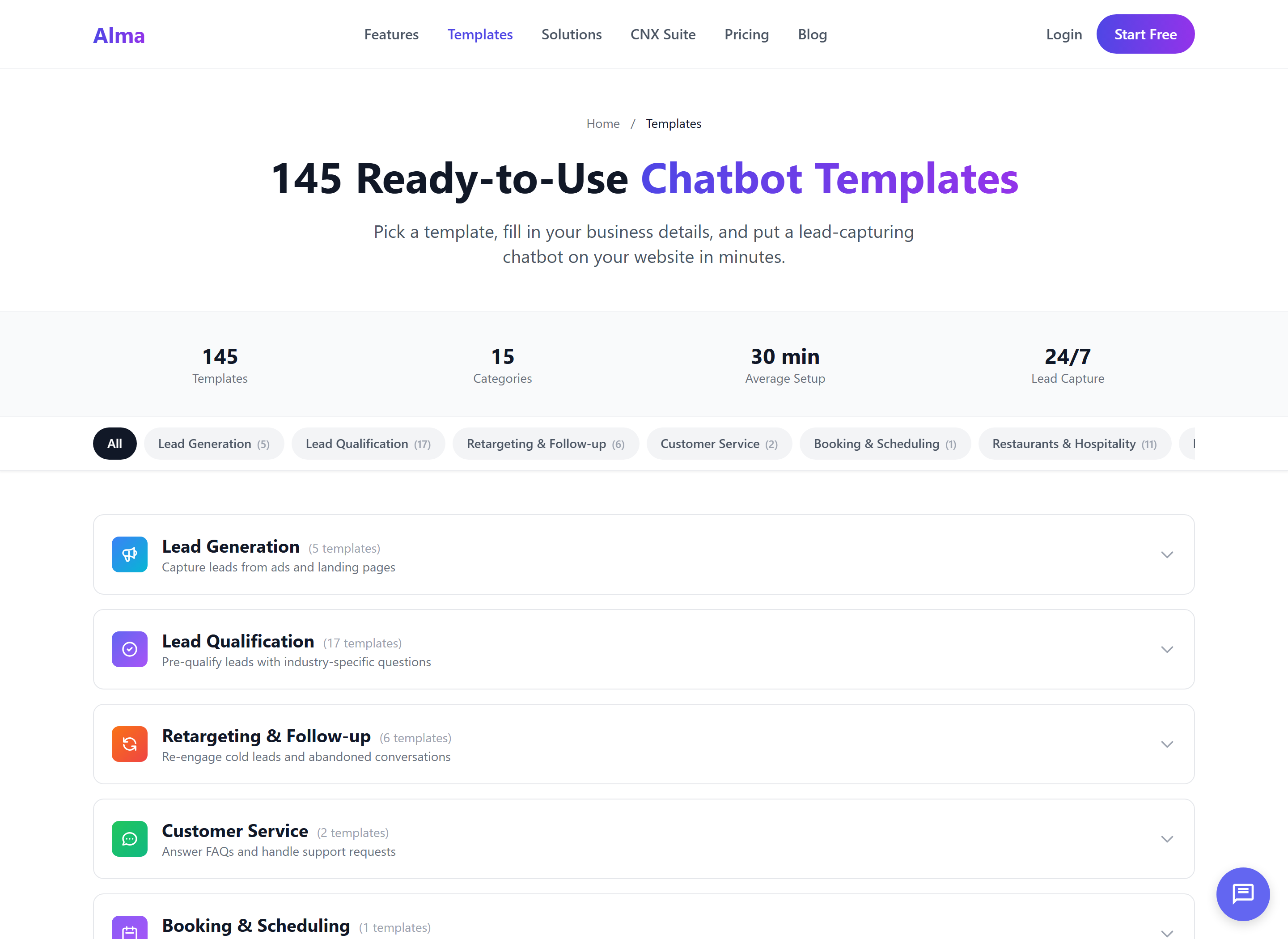
The Alma template library at 145 ready-to-use templates across 15 categories, grouped by job: lead generation, qualification, booking, retargeting and support.

Widget settings

Chatbot widget settings for each client

Each client's chatbot has its own widget settings, so the chat window can match the client's website. Every widget also shows a small "Powered by Alma" line. Contact us about removing Alma branding.

/01

Name and welcome message

Give each client's bot its own name and opening message, written in the client's own words, so visitors are greeted by the business they came to see.

/02

Colors

Set the widget's main color and text color to match the client's brand, so the chat window looks like part of the client's site.

/03

Position and placeholder text

Place the chat bubble in the bottom-right or bottom-left corner, and set the text visitors see in the message box before they type.

REST API

Chatbot agency REST API: workspace and template automation

The Agency tier includes a REST API, which lets your own scripts do tasks you would otherwise do by hand in the dashboard: listing client workspaces, creating a new one, and adding a starter template to it. Each request is authorized with your agency token (a private key that identifies your account). Creating a workspace returns its ID, its name and its slug (the short name used in its web address).

GET

/api/v1/agency/workspaces

Lists every client workspace under your agency account, with its ID, name, slug, active bot count, conversations this month and creation date.

POST

/api/v1/agency/workspaces

Creates a new client workspace from a workspace name (and, if you like, the client's contact name and email) and returns its ID, name and slug.

POST

/api/v1/agency/workspaces/<id>/deploy-template

Adds any of the 145 templates to a client workspace as a starting flow and returns the new bot's ID, so the agency can adjust the questions before publishing.

# Create a client workspace and add the Buyer Lead Qualification Bot template

curl -X POST https://helloalma.chat/api/v1/agency/workspaces \
  -H "Authorization: Bearer $ALMA_AGENCY_TOKEN" \
  -H "Content-Type: application/json" \
  -d '{"workspace_name": "Coastal Realty Group", "client_email": "jordan@example.com"}'

# → returns {"id": ..., "workspace_name": ..., "slug": ...}; use the id as $WS_ID:
curl -X POST https://helloalma.chat/api/v1/agency/workspaces/$WS_ID/deploy-template \
  -H "Authorization: Bearer $ALMA_AGENCY_TOKEN" \
  -H "Content-Type: application/json" \
  -d '{"template_id": "re_buyer_qual"}'
# → returns {"bot_id": ..., "workspace_id": ..., "template_id": "re_buyer_qual"}

API access is included with every Agency-tier account.

There is no add-on fee and no separate plan. Once our team has turned on your client workspaces, use your agency token to create new ones automatically.

145 templates · 15 categories

145 chatbot templates for agency clients

Pick the template that matches the client's industry, add it to their workspace, change the wording to suit the client, and publish. The library is shared across your whole agency account, so your team builds a Mindful Yoga bot the same way it builds a Coastal HVAC bot.

LQ

Lead qualification

Buyer and seller qualifiers, showing scheduler, mortgage pre-qualification, legal intake.

17 templates
HC

Healthcare & medical

Appointment scheduling, new patient intake, insurance and billing questions.

10 templates
FIT

Fitness, wellness & beauty

Class booking, free trial pass, spa and salon booking.

12 templates
RST

Restaurants & hospitality

Reservations, menu navigator, private events, gift cards.

11 templates
HS

Home services

Quote requests, emergency service, service-area check.

10 templates
EDU

Education & coaching

Program finder, admissions inquiry, coaching leads.

10 templates
AG

Agency operations

New client intake, kickoff call scheduler, monthly check-in prep.

12 templates
+8

Plus 8 more categories

E-commerce, political campaigns, professional services, internal operations, lead generation, follow-up, customer service and booking.

63 templates

All 145 templates are available inside every client workspace. Add them through the workspace dashboard or the POST /deploy-template endpoint.

How an agency onboards a new client

How agencies onboard a new chatbot client in four steps

Bright Loop follows these steps each time a new client signs on. The first three steps happen in the Agency dashboard or through the REST API. The fourth is a decision about who logs in afterward.

/01

Create the workspace

Use three clicks in the Agency dashboard, or send one POST request to /api/v1/agency/workspaces with the workspace name. You receive the new workspace's ID, name and slug.

/02

Add a template

Pick the closest match for the client's industry, such as a buyer qualifier, class booker or estimate scheduler. Add it to the workspace as a starting flow.

/03

Set up the widget

Set the widget's name, welcome message, colors and position so the chat window matches the client's website.

/04

Hand off, or keep it managed

Give the workspace login to the client's marketing contact, or manage the bot yourself and pass the new leads to the client. Most agencies manage it themselves.

Agency pricing

Agency chatbot pricing: $199/month, 20 client bots

The Agency tier is a single $199/mo plan that covers all of your clients up to the included limits. There is no fee per workspace and no charge per user. Annual billing lowers the price to $165/mo, a saving of about 17%.

/01 · Monthly

$199 /mo

Billed monthly. Cancel anytime.

/03 · What's included

  • 20 active bots across all workspaces
  • 50,000 subscribers
  • 100,000 messages / month
  • Unlimited team members
  • Sub-account workspaces · isolated per workspace
  • Agency summary · totals across every workspace
  • REST API · workspace + template deployment
  • Priority support · all 145 templates
See the full tier comparison →

Start with two workspaces and add more as you go.

Start the 14-day trial and build a real chatbot. When you move to the Agency plan, our team turns on your client workspaces and you can add clients as you go. No card is required.

Common questions

Agency chatbot platform FAQ

If yours isn't here, send us a note and a real person will reply the same day.

Can a client log into their own workspace independently?

Yes. You can give your client's marketing contact a login that opens only their own workspace. When they sign in, they see only their workspace, and they cannot see the main agency account or any of your other clients. Most agencies do not use this option and manage the workspace themselves, but it is available for clients who want their own access.

Does each workspace count against the 20-bot limit, or is it 20 per workspace?

It is 20 active bots total across the whole agency account, not 20 per workspace. For example, if Coastal Realty needs three bots, Mindful Yoga needs one and Coastal HVAC needs two, you have used six of your twenty. The same rule applies to the 50,000 subscribers and 100,000 messages, which are shared across every workspace in your agency account. If you need more, the Enterprise tier raises the limits.

Can I move a workspace to its own billing later?

Yes. If a client no longer wants you to manage Alma for them and prefers to run it on their own, we will convert the client workspace into a separate Alma account on whichever tier matches their volume. The conversation history, lead exports, flows and widget settings all move with the workspace. Nothing needs to be rebuilt or deleted, and the agency stops paying for that workspace.

Can I remove Alma branding from client widgets?

Removing Alma branding is not a self-serve setting on any plan, and every widget shows a small "Powered by Alma" line. You can set each client bot's name, welcome message, colors and position so the widget matches the client's website. Contact us about removing Alma branding.

Can I bring my existing client list?

Yes. Each workspace supports CSV (spreadsheet file) import for contacts and past conversation data. If you prefer to automate it, a script can create each workspace and add its template through the API, working through your client list one workspace at a time. Most agencies move three or four existing clients on the first day and add the rest over the first couple of weeks.

Set up your agency

Start your agency chatbot trial, no credit card

The 14-day trial needs no credit card. Build a real chatbot, see how it works with your visitors, and then decide whether to continue. Client workspaces and the REST API come with the Agency plan, and our team turns on the workspaces when your account is set up.

Tier
Agency · $199/mo · $165/mo annual
Capacity
20 bots · 50K subs · 100K msgs
Onboarding
Real person · same-day reply