· For salons & spas

The AI chatbot for salons & spas: book the chair while you're cutting hair.

Alma is a website chatbot for independent salons, multi-stylist studios, day spas, med-spas, and aesthetic clinics. The bot answers the service inquiry, asks which stylist or treatment the client wants, and records the client's agreement to the deposit policy for long color or injectable services. It then passes the complete lead to your front desk while you are still working with a client.

/INDUSTRY · SALONS & SPAS · 8 SALON-RELEVANT TEMPLATES

· Who runs it

Built for salons, day spas, med-spas, aesthetic clinics, solo stylists, and multi-chair studios.

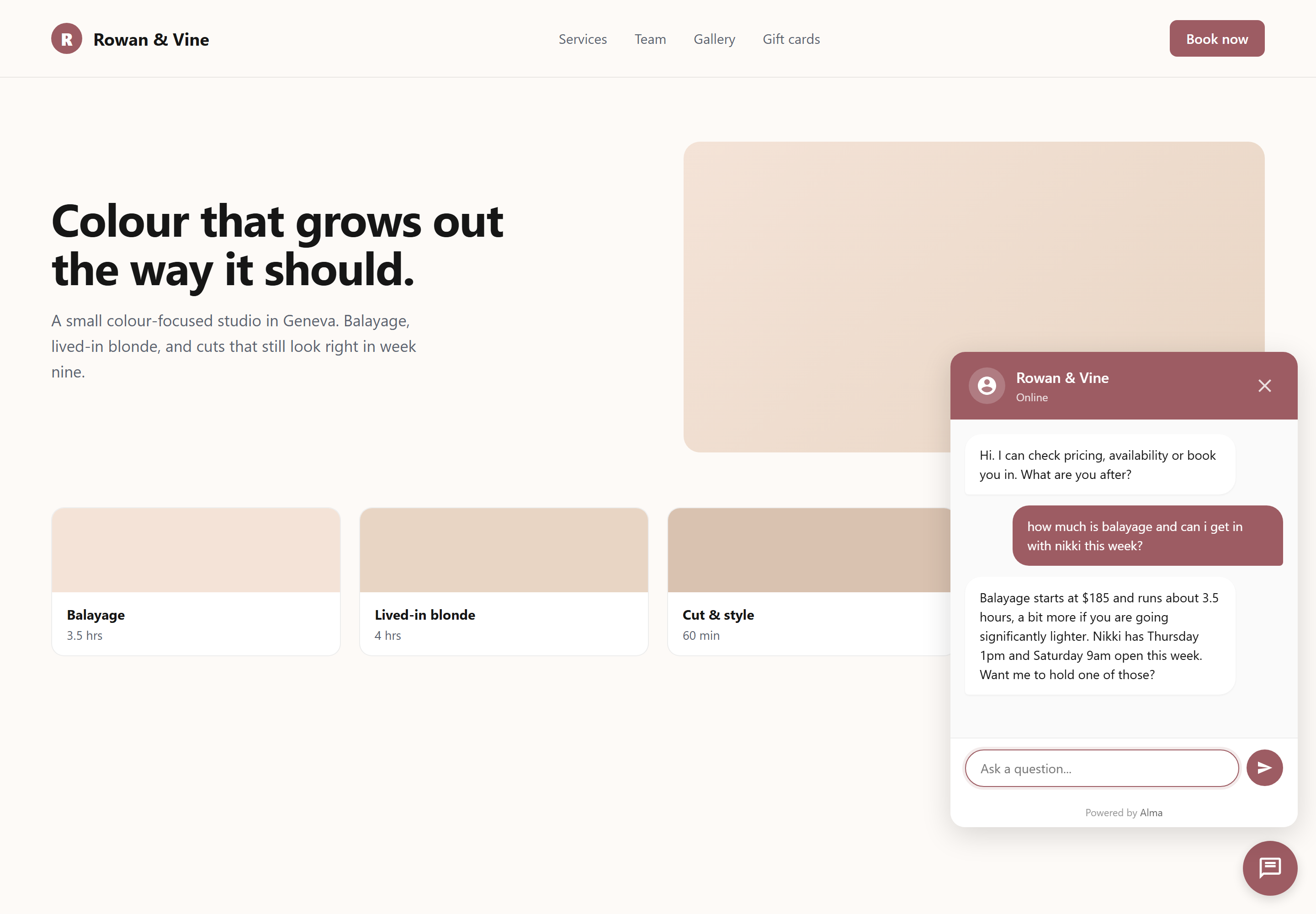
The Alma chat widget open on a salon website. A visitor has asked how much balayage costs and whether they can get in with Nikki this week, and the bot answers both from the salon's own knowledge: $185 and about 3.5 hours, with Thursday 1pm and Saturday 9am still open.

/01 · WHY THIS WORKS

How a salon chatbot answers the next client while you're working

Consider a 4-chair salon owner who spends half her morning answering "what time tomorrow?" texts on her own phone between blowouts, while color is processing and her stylists are asking where the toner is. Alma's widget (the chat window on her website) appears in the bottom-right corner of her site and has the same conversation she would: which service, which stylist if you have one, what day works, here's the deposit policy. The lead is emailed to her front desk and triggers a confirmation text message through CampaignCNX+ (our companion texting service), while she is still finishing a cut.

  • Records the service the client wants (cut, color, balayage, facial, injectable)
  • Sends the request to the preferred stylist when the client has one
  • Asks about the deposit policy for long color services and services with frequent no-shows
  • Passes the lead to the front desk by email
  • Works at 9pm, at midnight, and on Sundays, when booking questions often arrive
  • Never interrupts you while you are with a client

Build your service selector this afternoon.

Choose the salon-and-spa template, edit your services list and stylists, and paste the snippet on your Squarespace, Wix, or WordPress site. Your first inquiry could arrive tonight.

· Example salon conversations

Multi-stylist salon · service select

Cut + color + treatment

Hi! What can we book you for today?
Cut and color, maybe a gloss too
Got it. Single-process or balayage?
Single-process
Perfect, that's about 2.5 hrs with a gloss. Do you have a stylist preference?

4-chair salon · stylist match

Tuesday with Andrea, or Saturday with Jake

Any stylist you've worked with before?
Andrea, ideally
Andrea has Tuesday at 2pm or Thursday morning. Jake is open Saturday if a weekend works better.
Tuesday 2 works
Booked the request with Andrea. The front desk will text to confirm. What's the best number?

Day spa · deposit booking

Long-color $50 deposit

Balayage runs 3.5 hours. We hold the chair with a $50 deposit. Okay?
Yep, that's fine
Great. Front desk will email a payment link within an hour. Best email + phone?
jess@gmail.com / 312-555-0142
Got it. Once the deposit clears the chair is yours and the appointment is confirmed.

Med-spa · consultation request

Injectable intake before booking

Are you booking a treatment or starting with a consult?
Consult, first time on filler
Got it. Consults run 30 min, no charge. Which areas are you considering?
Lips, maybe under-eye
Noted. We'll send the intake form before your visit. Best email for the paperwork?

/02 · SALON & SPA TEMPLATES

Salon & spa chatbot templates: 8 starter flows

Choose a template, edit your services, stylists, and deposit policy, and paste the snippet. Each template is a flow (a set of questions the bot asks in order) that already includes the right questions for service selection, stylist matching, deposit agreement, and consultation intake. The templates were written by people who have actually worked in salons. The file names below are the real templates in the Alma library.

  • Salon booking flow fitness_wellness/salon_booking.json The default starting point: service selection, stylist preference, day and time, and contact details.
  • Appointment reminder fitness_wellness/appointment_reminder.json Confirms an upcoming appointment and gives the client an option to reschedule.
  • Spa service selector fitness_wellness/spa_service.json Day-spa version: facials, massages, body treatments, by treatment-room availability.
  • Post-visit review and rebooking fitness_wellness/post_visit_review.json After the visit: collects feedback and encourages the client to book the next appointment.
  • Appointment scheduler booking/appointment_scheduler.json General purpose: useful for solo aestheticians or studios with one simple list of services.
  • Beauty recommendation fitness_wellness/beauty_recommendation.json For salons that also sell products: recommends products related to the service the client just booked.
  • Waitlist signup hospitality/waitlist.json Stylist-specific waitlists: captures the request when your top stylist is fully booked.
  • Gift card inquiry hospitality/gift_card.json Holiday gift-card sales: records the request and sends it to your retail email.
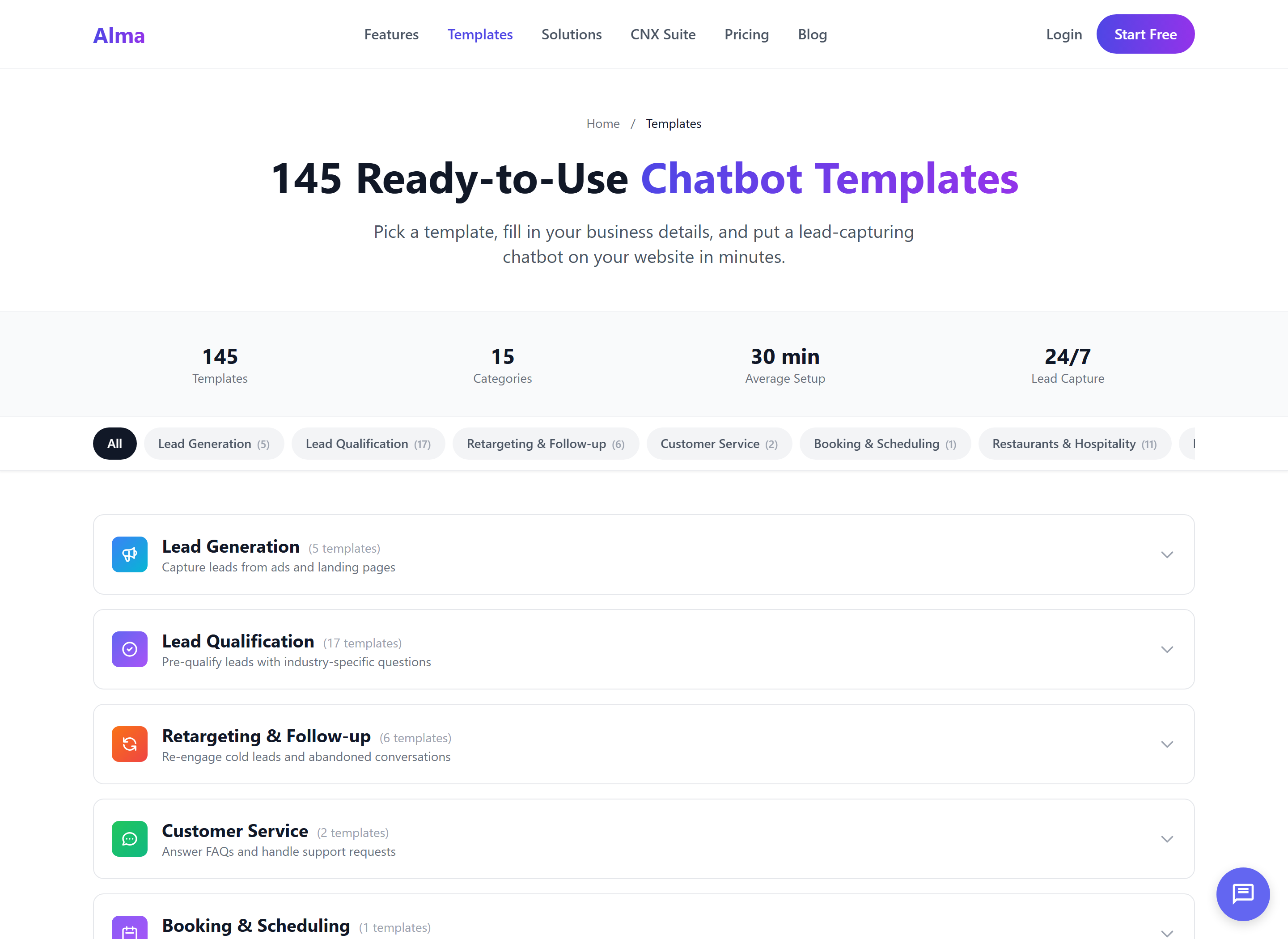
The Alma template library at 145 ready-to-use templates across 15 categories, grouped by job: lead generation, qualification, booking, retargeting and support.

Load a template, edit the service list, and publish.

The hardest part of building a chatbot is deciding what to ask, and the templates have already done that for you. You edit a starter flow instead of starting from a blank page.

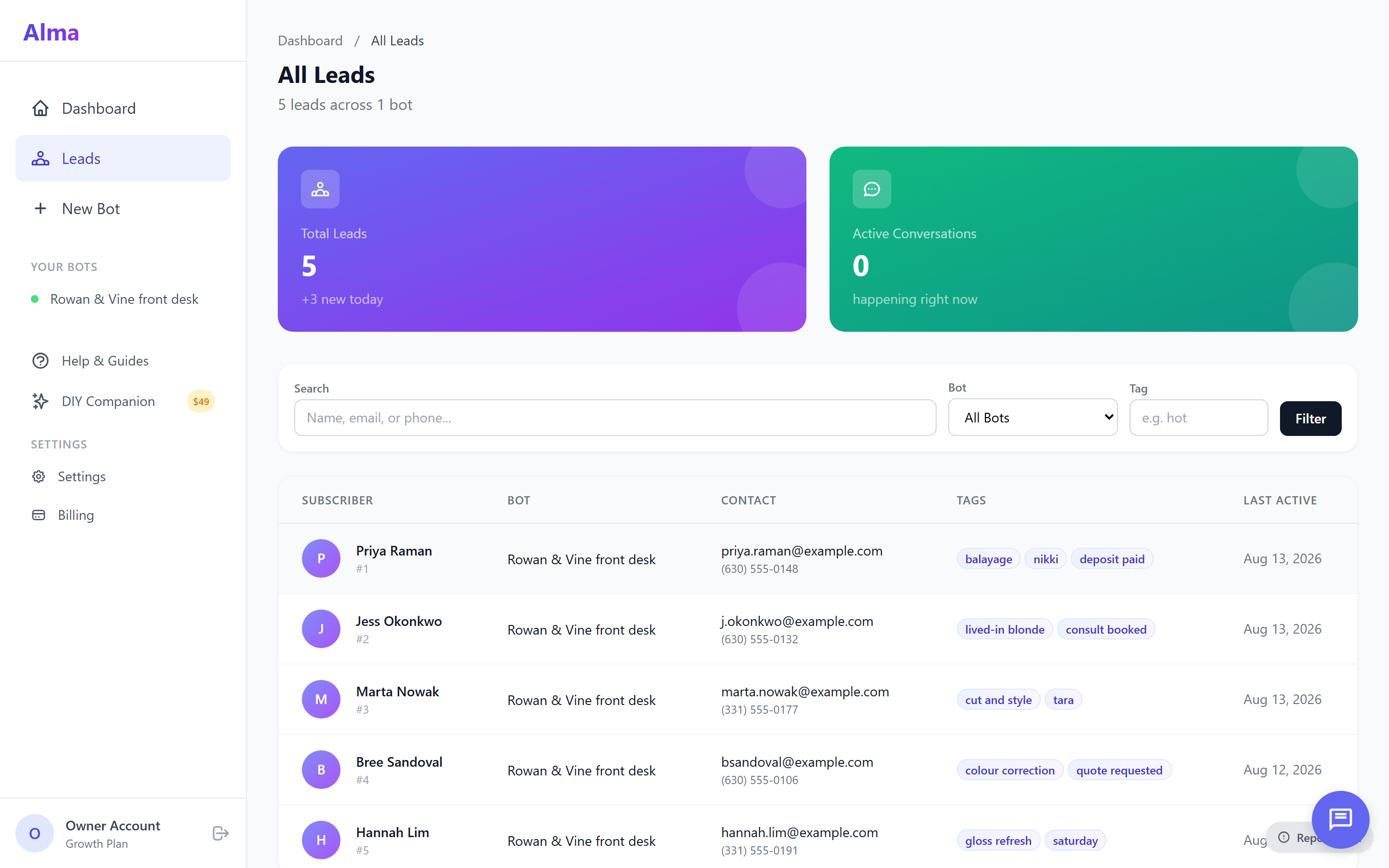
The Alma leads inbox for a salon, showing five captured leads with the tags the booking flow set on each one: balayage with Nikki and a deposit paid, lived-in blonde with a consult booked, a cut and style with Tara, a color correction quote request, and a Saturday gloss refresh.

/03 · YOUR BOOKING SYSTEM

Salon chatbot integrations: Vagaro, Boulevard, Fresha, Square, Mindbody, Acuity

Alma does not have native one-click integrations with the large salon booking systems today. Instead, it records the request (service, stylist, preferred day and time, deposit agreement, contact information) and passes the complete lead to your front desk through a Zapier zap (an automation in Zapier, a service that passes information between apps) or, on the Agency plan and up, a webhook (an automatic message Alma sends to another system). Your booking system still holds the appointment. Alma's role is to capture the lead before the visitor leaves your homepage.

Vagaro Through Zapier
Boulevard Webhook → API
Fresha Through Zapier
Square Appointments Through Zapier
Booker Through Zapier
Mindbody Webhook → API
Acuity Through Zapier
Front desk only Email
  • Lead → email to the front desk to confirm
  • Booking confirmed → CampaignCNX+ text message (useful for "your appointment is held" messages)
  • Deposit-required services → email to client with a Stripe Checkout link through Zapier
  • A contact and timeline entry in CoreCNX (the suite's CRM, or contact database), so each client has one record
  • A standard webhook for salons with their own booking software (Agency plan and up)

· From sign-up to first inquiry

Set up your salon chatbot in 30 minutes

The salons that get the most from Alma start with one of the templates above and edit only what is different about their business: the service menu, stylist names, and deposit rule. Everything else is already set up.

/01

Pick a template

Choose Service Select for a multi-stylist salon, Stylist Match if you want requests sent to specific stylists, Consultation Scheduler for a med-spa, or Spa Service for a day spa with treatment rooms.

/02

Edit your services and stylists

Type your service menu into the question node (the step in the flow that asks the question), such as cut, color, balayage, facial, lash, or injectable. Then list your stylists and set the deposit rule for long color services.

/03

Paste the widget

Add one line of JavaScript code to your Squarespace, Wix, or WordPress site. The widget is live as soon as the page reloads, and you can set its colors to match your site.

/04

Receive your inquiries

Each booking inquiry is emailed to your front desk and triggers a confirmation text through CampaignCNX+. Requests that need an appointment the same day can be tagged as hot leads, which sends you a separate hot-lead email.

Start building your salon's bot today.

The 14-day free trial does not require a credit card. The salon-and-spa template loads in one click. After you edit your services and paste the snippet, the bot is live.

· Common questions

Salon & spa chatbot FAQ

If your question is not answered here, send us a note and a real person will reply the same day.

Will it work with Vagaro, Boulevard, or Fresha?

There is no native one-click integration today, and we will not claim otherwise. Alma connects to those systems through Zapier or, on the Agency plan and up, a standard webhook. The bot records the booking request (service, stylist, deposit agreement, contact), and your booking system still holds the actual appointment. Most owners send the lead to the front desk first, where staff enter it into Vagaro, Boulevard, or Fresha by hand. Others send it to a Zap that creates the appointment for them.

Can it take deposits?

Alma does not process payments itself. Instead, it records the client's agreement to the deposit in the conversation ("I understand a $50 deposit holds the chair") and directs them to a payment link. This is usually a Stripe Checkout link sent by a Zap, or an email from the front desk with the link. The bot handles the conversation, and Stripe handles the card payment. We keep these separate on purpose, because payment processing is heavily regulated and Alma does not try to take that on.

How does it handle stylist-specific waitlists?

The bot can ask which stylist the client wants, show the available times you have set up (for example, "Andrea has Tuesday 2pm or Thursday morning"), and record the request when nothing fits. The waitlist template (hospitality/waitlist.json) is built around that flow: name, stylist, service, preferred days, and flexibility. The lead is emailed to your front desk so staff can contact the client when an opening comes up.

Which pages does the widget show up on, and does it work on phones?

You decide. Most salons show the widget across the whole site, so it is there whether a client arrives on the homepage, a service menu, or a stylist bio. You can also limit it to a few pages, such as only the booking page and the pricing page. On a phone the chat opens full screen instead of in a small corner window, which matters because most salon visitors use phones. The snippet is one line of JavaScript that loads after your page content, so your pages load as fast as they do now.

What about no-shows?

There are two ways to reduce them. First, set a deposit requirement for services with frequent no-shows (long color, balayage, injectables). The bot records the client's agreement to the deposit and directs them to your payment link. Second, connect CampaignCNX+ texting to the flow so a reminder text is sent the morning of the appointment. Together, the deposit and the reminder text reduce no-shows without you having to follow up with each client.

Can each stylist have their own bot?

Yes, within the bot limit of your tier. Starter includes 1 active bot, Growth includes 5 bots ($79/mo, the popular tier), and Agency includes 20 bots ($199/mo). A 4-chair salon usually runs one bot for the whole salon and asks about the stylist inside the conversation. A multi-location group runs one bot per location. The Agency tier includes sub-account workspaces (separate account areas), which our team turns on when the account is set up, for multi-location owners who want separate data and logins for each location.

Can I remove the Alma branding from the widget?

Not on any plan today. The widget shows a small "Powered by Alma" line. You can set the bot's name, welcome message, colors and position so the chat matches your salon's brand. Contact us about removing Alma branding.

What's the typical setup time?

Setup takes under 30 minutes from sign-up to the first inquiry, using the templates built into the library. Most of that time goes to typing your service menu into the question node and listing your stylists, which Alma cannot do for you. Pasting the widget on a Squarespace, Wix, or WordPress site takes one line of code. If setup takes you more than an hour, please email us, because the problem would be with the template rather than with you.
· Related reading

· Start free

Start filling your chair tonight.

Sign up, load the salon-and-spa template, edit your service menu and stylist list, and paste the widget on your site. Your first inquiry could arrive while you are still finishing today's last appointment.

Trial
14 days, no credit card
Setup
Under 30 minutes for most salons
Onboarding
Real person, not a chatbot