— For home services

The chatbot for home services — pipe burst at 9pm, lead captured at 9:01.

HVAC, plumbing, electrical, roofing, pest control, landscaping, cleaning, handyman. Alma is the friendly qualifying chatbot that sits on your site asking the right questions while you're under a sink, on a roof, or driving back from a service call — capturing estimate requests, checking service-area coverage, and routing emergency vs. scheduled jobs to the right place.

Templates
10 home-services flows
Setup
Under 30 minutes
Free trial
14 days, no card
WIDGET · ESTIMATE SCHEDULER LIVE
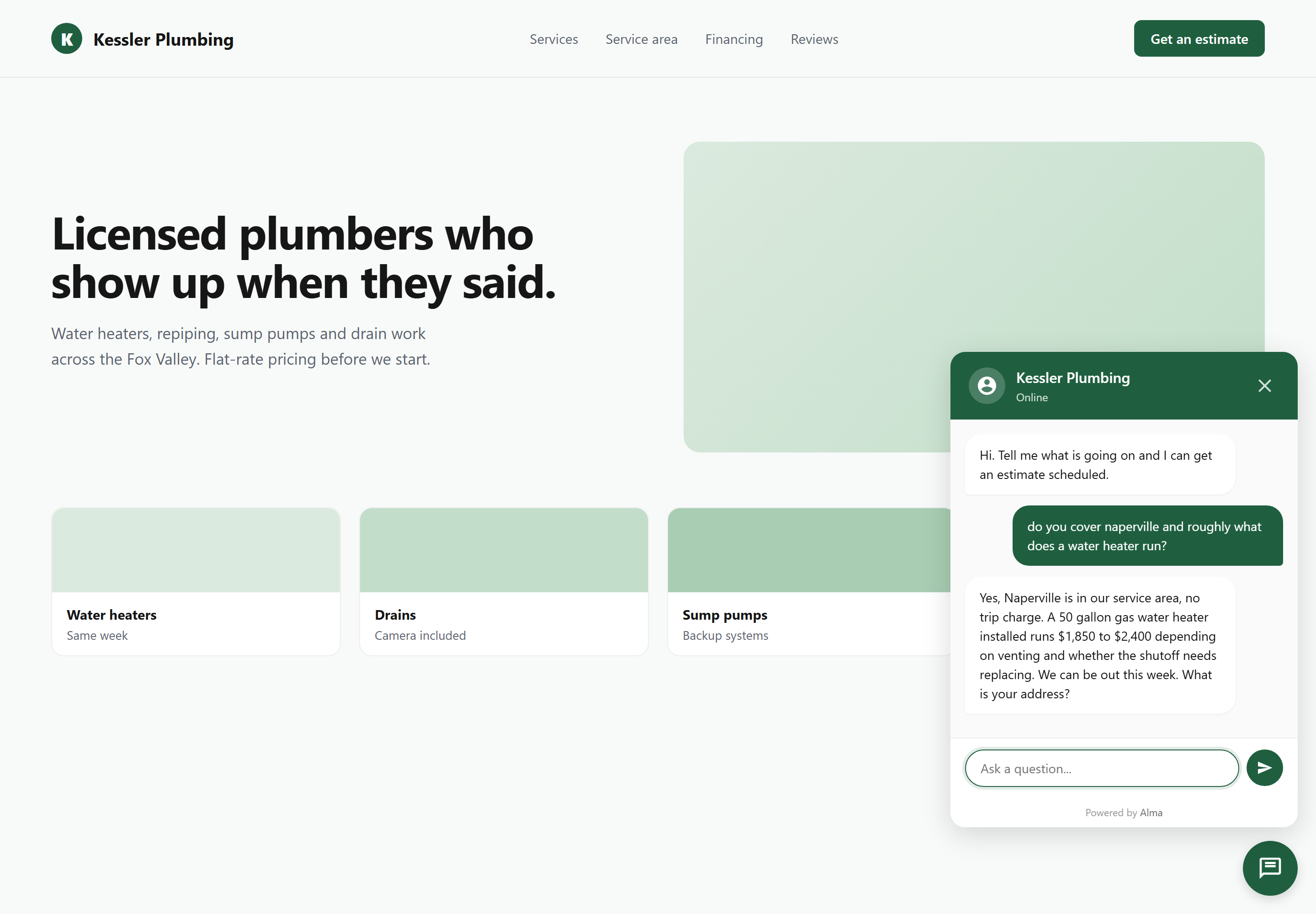
Alma chat widget embedded on a home-services contractor's website, showing the estimate-scheduling conversation a homeowner sees when they land on the site after hours

Built for solo trucks, two-truck shops, and multi-trade outfits. HVAC plumbing electrical roofing pest control landscaping cleaning handyman

— Why home-services owners run Alma

How a home services chatbot handles after-hours estimate requests

Picture an HVAC owner running calls between job sites. The phone rings while she's mid-service-call — she can't pick up. The next homeowner gives up after two rings and calls the next shop on Google. With Alma, that homeowner lands on the site, the widget greets them, and the conversation captures what's broken, where they are, how urgent, and the best number for the dispatcher to ring back.

/A — THE WIDGET ON YOUR SITE

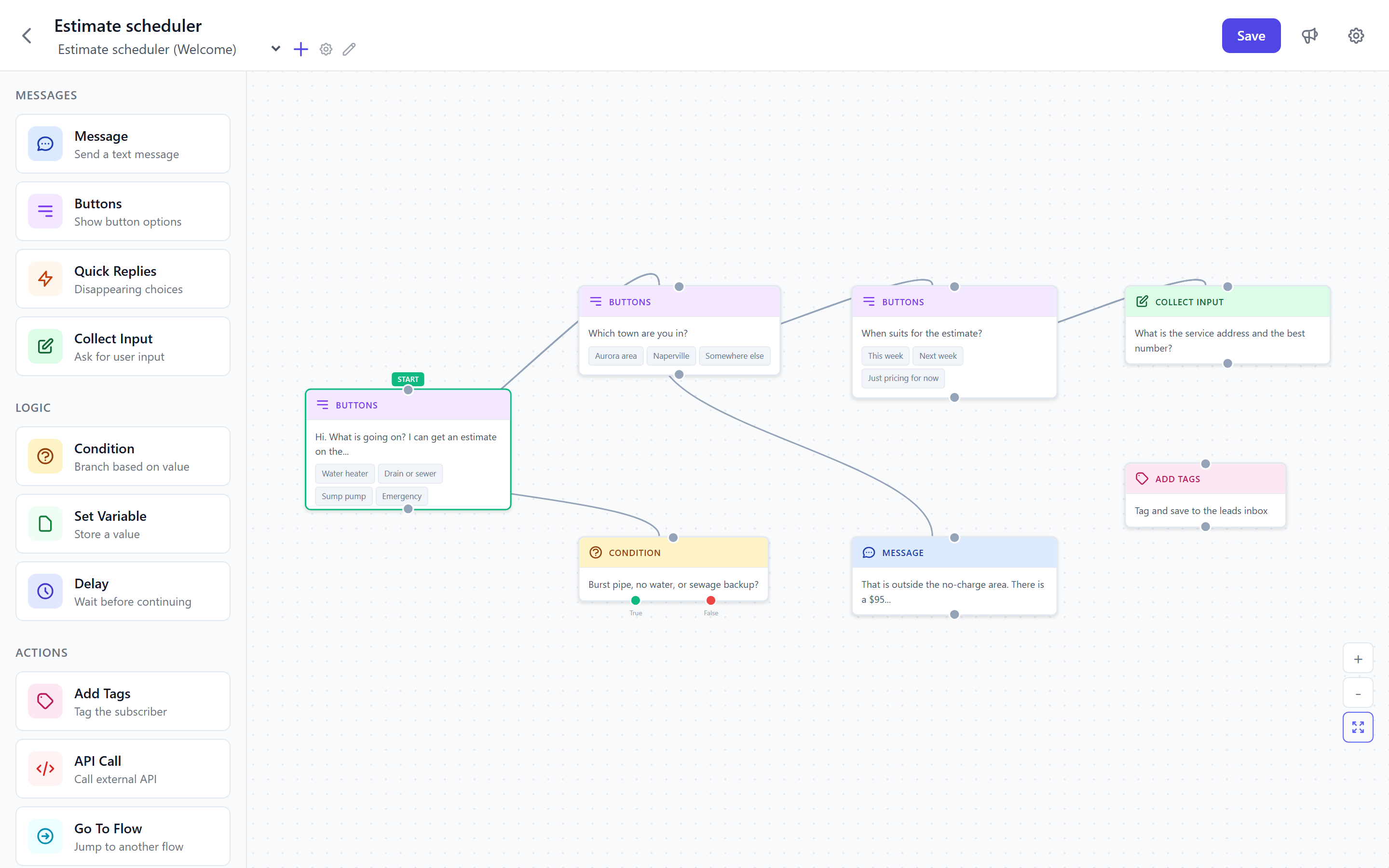
Service type, address, urgency, callback window — all four in one short conversation.

The Estimate Scheduler and Emergency Dispatch templates are written for the questions homeowners actually need to answer before a tech can be dispatched: what's broken, what's the address (so the bot can validate it's inside your service area), is it an emergency or can it wait, and what's the best window for a callback. By the time the homeowner clicks send, the dispatcher has a clean ticket — not a "someone called" voicemail.

  • Service type — AC, furnace, leak, panel, roof, pest, lawn
  • Service-area check — ZIP or address validated against your coverage
  • Urgency flag — emergency, same-day, this week, scheduled
  • Best callback window — this morning, after 5pm, weekend
  • SMS opt-in for "tech is on the way" texts
Where the lead lands
Dispatcher's Google Sheet · SMS to on-call tech
What fires when emergency = yes
Hot-lead flag · SMS to dispatch · email priority
Alma chat widget embedded on a contractor website showing the estimate-scheduling flow — service-type buttons, address capture, urgency selection, and callback-window question

Build your estimate-scheduler tonight.

Pick the Estimate Scheduler or Emergency Dispatch template, drop in your service area and after-hours policy, paste the widget. The next 9pm caller becomes a clean lead, not a missed ring.

— What an Alma conversation looks like, home-services edition

Home services chatbot flows — HVAC, plumbing, electrical, more

HVAC · Emergency dispatch

Same-day AC failure

Hey, what's going on at the house?
AC stopped, it's 92 inside
Got it — sounds urgent. Address so I can check we cover your area?
2914 Oak Ridge Rd, 30062
You're in our area. Best number for the on-call tech to call you back in the next 15 minutes?

Roofing · Estimate scheduling

Roof inspection next week

Roof issue, or scheduling an inspection?
Inspection. Storm last week.
Got it. Are you filing an insurance claim, or paying out of pocket?
Insurance
We work claims a lot. Address + a window next week — Tuesday morning, Thursday afternoon, Saturday?

Pest control · Service-area check

Does the crew cover this ZIP?

Looking for one-time treatment or a recurring plan?
Recurring — ants and spiders
Got it. ZIP code so I can confirm we cover you?
30075
Yep, that's in our route. Quarterly or monthly? And best time for the first visit?

Landscaping · Recurring signup

Monthly lawn care

Mow-and-go or full lawn-care plan?
Full plan
Lot size — under quarter acre, quarter to half, or half-plus?
About a third
Got it. Address + a number for the route lead to text you a quote tomorrow?

/B — HOME-SERVICES TEMPLATES

Home services chatbot templates — 10 trade-ready flows

The Home Services category in the Alma library has 10 dedicated templates — each a pre-built flow for one of the moves a trade contractor's site needs to make. Pick the one closest to what you do, edit your service types, your service area, and your after-hours policy, paste the widget. Most owners are live inside thirty minutes.

  • Home Services Welcome · the friendly front-door greeter that routes to quote, schedule, or emergency
  • Quote Request · service type, urgency, property type, project details — for accurate quoting
  • Service Scheduling · routine appointment booking with date, time, and service preferences
  • Emergency Service · urgent-request capture with safety prompts and immediate dispatch handoff
  • Service Area Checker · ZIP-code coverage validation before the lead is created
  • Roofing · repairs, replacements, and storm-damage / insurance-claim triage
  • Landscaping & Lawn Care · property size, services needed, mow-and-go vs. full plan
  • Cleaning Service · home size, frequency, special needs (move-out, post-construction, recurring)
  • Maintenance Plan Upsell · recurring-plan pitch to existing customers with monthly/annual pricing
  • Review Request · post-service review collection that filters unhappy customers to a private complaint flow
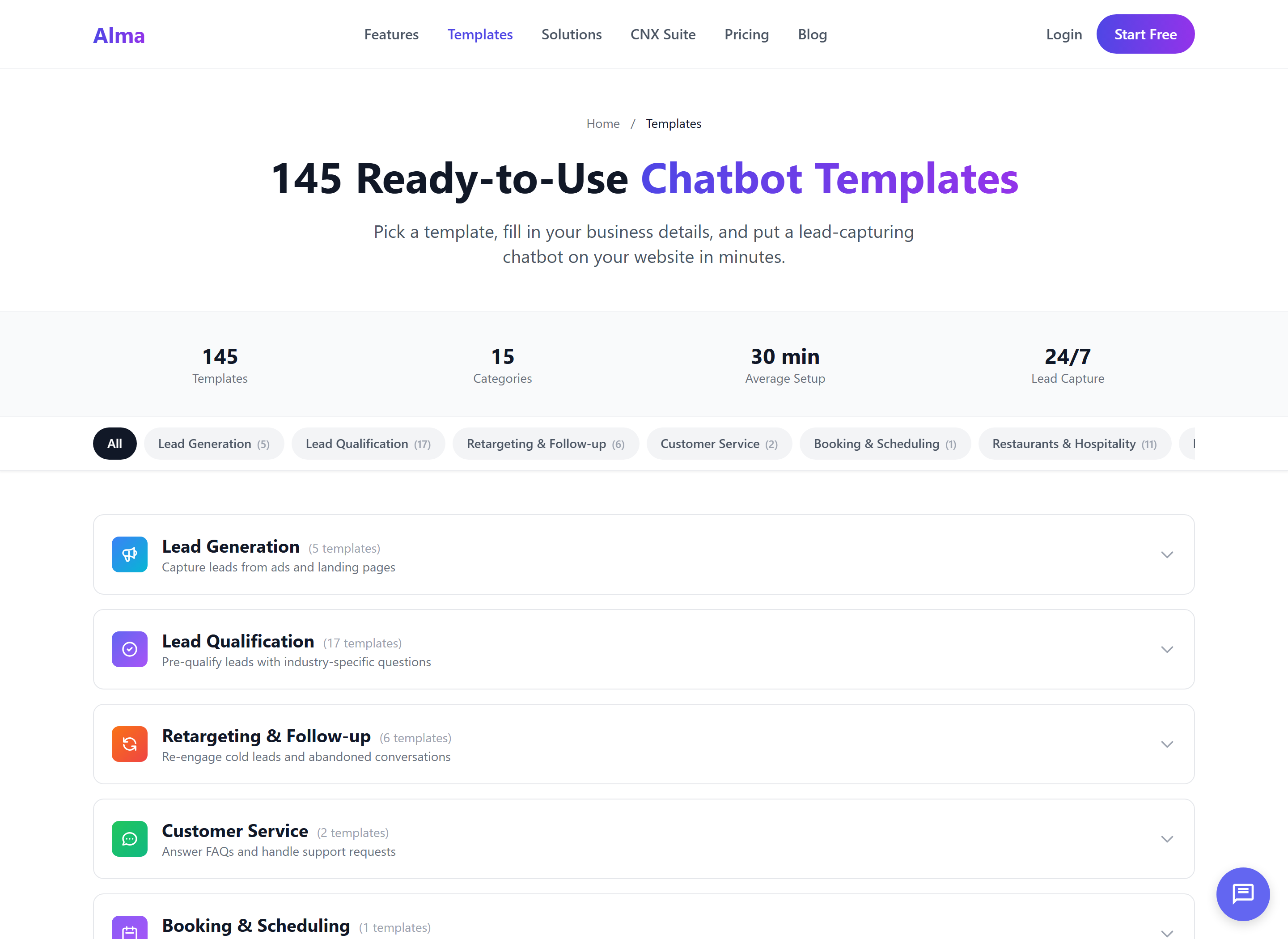
Alma template picker showing home-services-specific chatbot templates including Welcome, Quote Request, Service Scheduling, Emergency Service, Service Area Checker, Roofing, Landscaping, Cleaning Service, Maintenance Plan, and Review Request

10 templates in home_services/ — covering the front-door welcome, quote capture, scheduling, emergency triage, service-area validation, three trade-specific flows (roofing, landscaping, cleaning_service), recurring-plan upsell, and post-service review collection.

Pick the template. Edit your service area. Publish.

The questions are already written by people who run home-services flows for a living. Most owners ship their first bot in under thirty minutes — service types, ZIP coverage, after-hours policy, done.

— Where the lead actually goes

How the home services chatbot integrates with your field-service software

ServiceTitan, Housecall Pro, Jobber, Workiz, FieldEdge, Repairshopr — every home-services shop already runs one. Alma doesn't replace it; Alma is the front-door layer that turns a website visitor into a structured lead the FSM can pick up. There are no native integrations to those platforms today — the bridge is a webhook or a Zapier zap, which both work cleanly.

/C — FSM HANDOFF

ServiceTitan, Housecall Pro, Jobber & Workiz chatbot integration

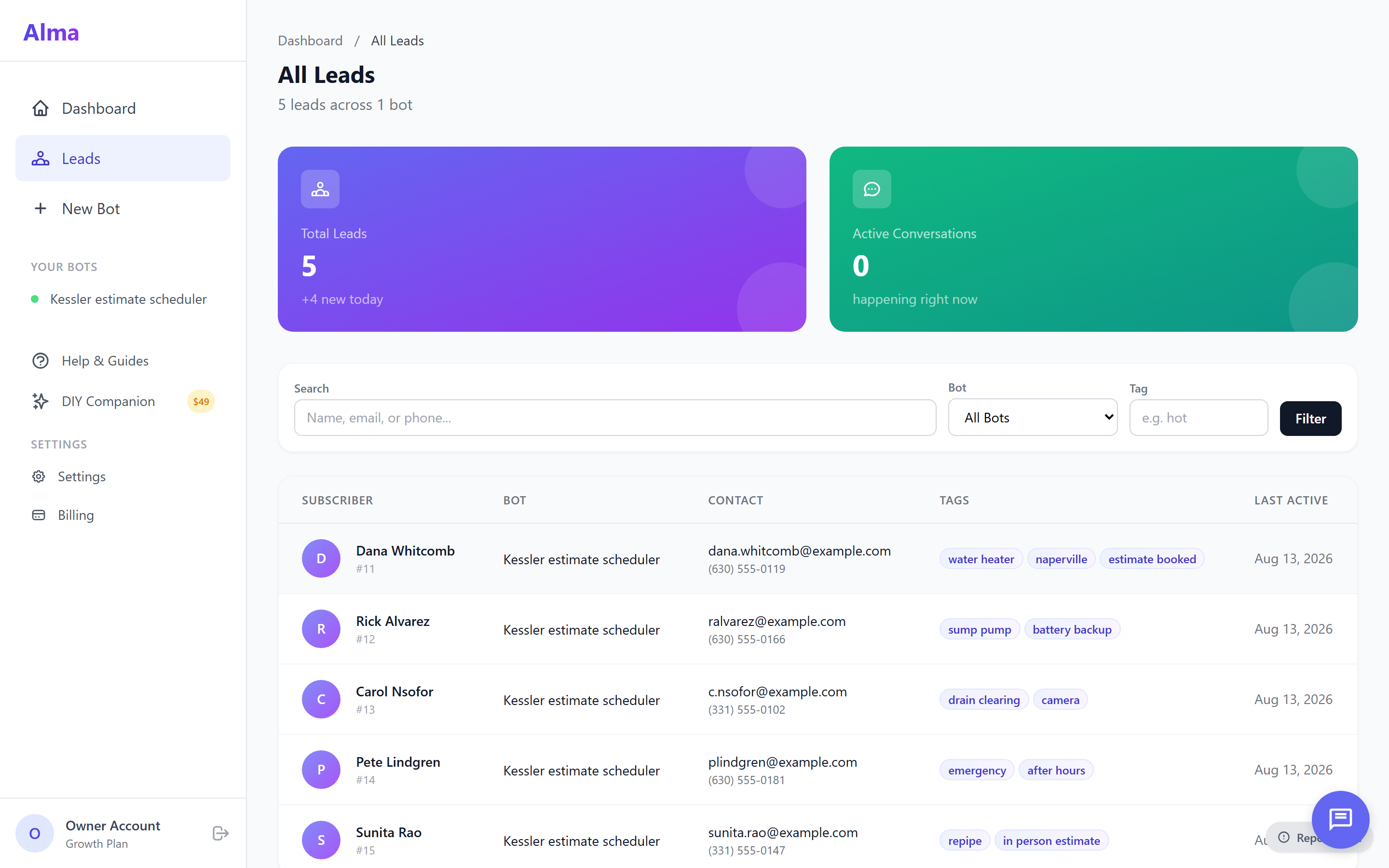
The moment the conversation ends, Alma fires a clean payload — name, phone, service type, address, urgency, callback window. Route that to your dispatcher's Google Sheet, push it as an SMS to the on-call tech via CampaignCNX+, and bridge it into ServiceTitan, Housecall Pro, or Jobber via a Zapier zap. Your FSM holds the schedule and the truck; Alma keeps the inbound full.

  • Google Sheets row for the dispatcher's queue
  • SMS to the on-call tech via CampaignCNX+ (estimate-confirmation + on-the-way texts)
  • Email alert to the office with hot-lead priority on emergency flags
  • Zapier bridge into ServiceTitan, Housecall Pro, Jobber, Workiz, FieldEdge, Repairshopr
  • Generic webhook for any FSM with an inbound API
  • CoreCNX contact + timeline event for customer history across services
Alma leads inbox showing home-services qualified-lead rows — name, phone, service type, address, urgency flag, callback window, ready for dispatcher handoff into Housecall Pro or ServiceTitan

— From sign-up to first estimate request

Set up your HVAC or plumbing chatbot in 30 minutes

Each flow asks what a working dispatcher already asks — service type, urgency level, address ZIP for area validation, preferred-day window. The Estimate Scheduler and Emergency Dispatch templates are the starting point. You edit copy, plug in your service area, paste the snippet on the site.

/01

Pick a template

Estimate Scheduler, Emergency Service, Service Area Checker, or one of the trade-specific flows (roofing, landscaping, cleaning). Click "Use this." The flow loads with proven questions.

/02

Edit your service area

Drop in your trade scope, your covered ZIPs or radius, your emergency criteria, your after-hours policy. Swap company name and phone. Twenty minutes of edits, max.

/03

Paste the widget

One line of JavaScript on your site — WordPress, Squarespace, a custom theme, doesn't matter. The widget is live the moment the page reloads.

/04

Watch leads land

Estimate requests land in the dispatcher's Google Sheet. Emergency flags fire SMS to the on-call tech. The lead arrives qualified — service, address, urgency, callback window — not a voicemail.

Your next estimate request lands tonight.

14-day free trial. No credit card. The Estimate Scheduler template, your service area, the widget on your site — that's the whole setup.

— Home-services FAQ

Home services chatbot FAQ

Does it integrate with ServiceTitan, Housecall Pro, or Jobber?

No native integrations today — the bridge is a webhook or a Zapier zap, both of which work cleanly. Every Alma lead can fire a webhook with the full payload (name, phone, service type, address, urgency), and Zapier or Make routes that into ServiceTitan, Housecall Pro, Jobber, Workiz, FieldEdge, or Repairshopr. Native FSM integrations are on the roadmap, but the bridge approach has worked for every shop on the platform so far.

Can it actually dispatch a tech, or just capture the lead?

Captures and routes — your FSM dispatches. Alma is the conversation layer: it asks the qualifying questions, validates the service area, flags urgency, and pushes the structured lead to your Sheet, SMS, or FSM. The actual truck-routing and tech-assignment stays in ServiceTitan or Housecall Pro where it belongs.

How does it handle service-area checks?

Configure your covered ZIPs or a radius around your office, and the Service Area Checker template (or any flow that pulls in the service-area block) validates the address before the lead is created. If the homeowner is out of area, the bot says so politely and offers to take their info anyway in case you expand. If they're in area, the conversation continues into scheduling.

What about emergency vs. scheduled triage?

The Emergency Service template asks the urgency flag up front — emergency, same-day, this week, scheduled. Emergency answers fire a hot-lead notification (SMS to the on-call tech, email priority to the office), while scheduled ones flow into the regular estimate queue. You configure what counts as an emergency for your trade — burst pipe, no AC in summer, no heat in winter, electrical out, roof actively leaking.

Can I have separate bots for residential vs. commercial?

Yes — on the Growth tier ($79/mo) and up. Growth includes 5 active bots, Agency includes 20. Most multi-trade shops run one residential Estimate Scheduler, one commercial Estimate Scheduler, an Emergency Service flow, and a Maintenance Plan Upsell — all four fit comfortably in Growth.

What about multi-trade or multi-location?

The Agency tier ($199/mo) gives you sub-account workspaces — one workspace per trade or per location. A multi-trade outfit running HVAC, plumbing, and electrical can keep each trade's bots, leads, and reporting fully isolated per workspace. Same for a regional franchise running separate locations under one parent account.

Will Instagram DMs and Facebook Messenger work for inbound?

Both channels are in development and pending Meta approval — we're not quoting an ETA we don't trust. The website widget is fully live today and is where most home-services shops get the highest-intent inbound anyway. When Messenger and Instagram ship, the same flow runs across all three.

How fast is setup, really?

Under thirty minutes for most owners. The home-services templates are pre-built — service-type lists, urgency flags, service-area validation, callback-window questions are already wired. You're editing copy (your trade scope, your ZIPs, your after-hours line), pasting the widget snippet on your site, and watching the first conversation come through. The longest part is usually deciding which trade flows you want active.

— The CNX Suite

Alma is the inbound piece. The rest of the suite handles outbound.

Alma works standalone — most home-services shops run it that way. If you also do route-based outbound (door-to-door pest control, solar canvassing, security upsells), Beacon handles the field side; CampaignCNX+ pushes the on-the-way SMS; CoreCNX keeps the customer history across services in one timeline.

Conversations

Alma

Drag-and-drop chatbots for your website. 10 home-services templates. Estimate capture, dispatch handoff. Messenger and Instagram in active development.

SMS

CampaignCNX+

Estimate-confirmation texts and on-the-way notifications. From $0.06 / message — hooks straight into the lead Alma just captured.

Field ops

Beacon

Door-to-door operations — pest control routes, solar canvassing, security upsells. The outbound counterpart to Alma's inbound. From $59 / month.

CRM

CoreCNX

Unified contact timeline — every Alma conversation, every CampaignCNX+ text, every Beacon door knock on one customer record. Customer history across services.

— Related reading

— Start free

Next estimate request lands tonight.

Sign up, pick the Estimate Scheduler template, drop in your service area, paste the widget. The 9pm pipe burst becomes a qualified estimate request in your inbox before you've finished dinner — service area validated, urgency triaged, name and number in hand.

Trial
14 days, no credit card
Setup
30 minutes for most owners
Onboarding
Real person, not a chatbot