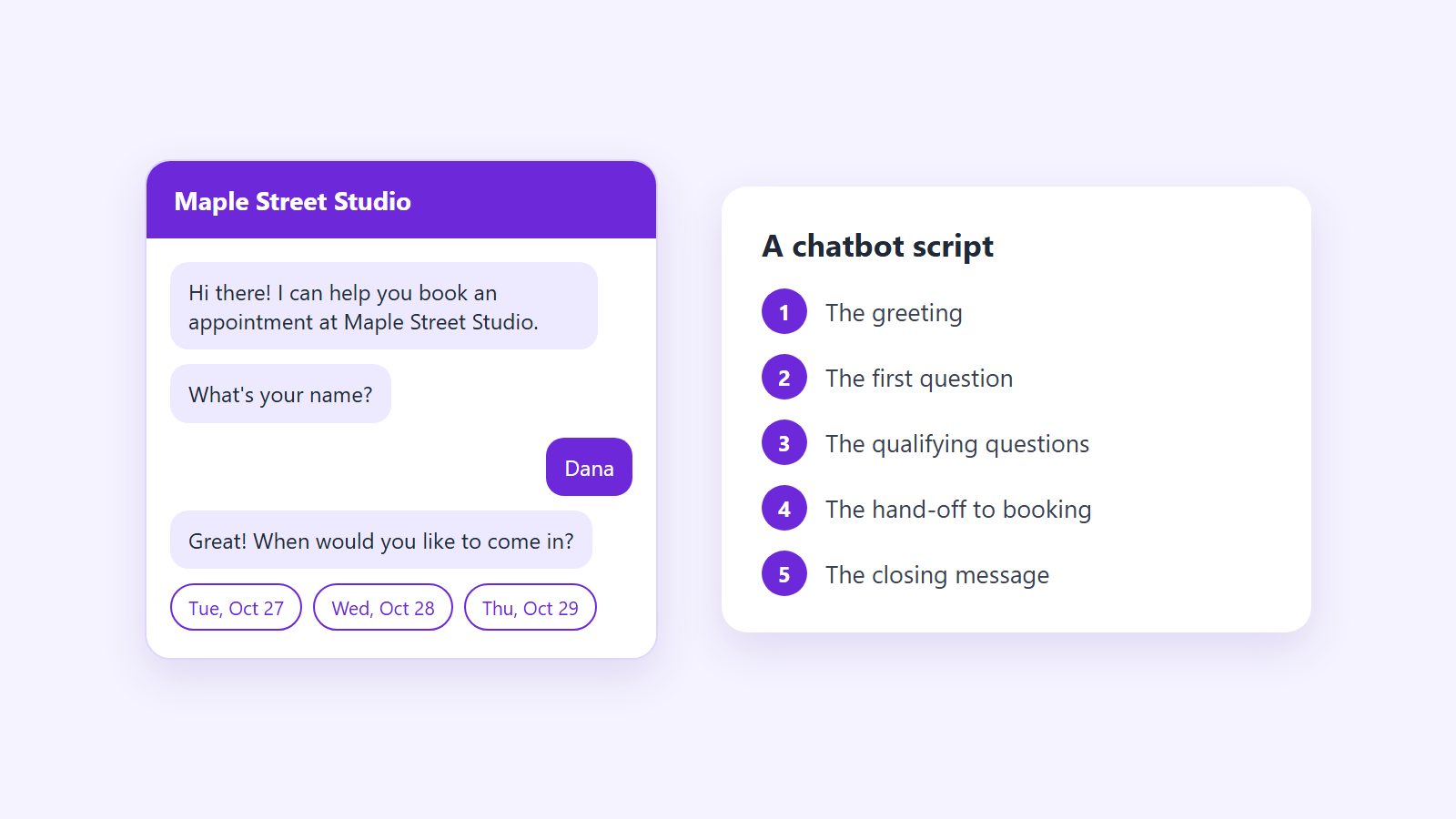
A chatbot script is the set of messages your chatbot sends and the order it sends them in: the greeting, the questions, the choices it offers as buttons, and the message that tells a visitor what happens next. Writing it is most of the work of building a chatbot, and it decides whether visitors finish the conversation or close the window halfway through.
This post gives you a chatbot script template to fill in, explains how to write each part, and then walks through complete chatbot script examples for six kinds of business. Every example comes from a template in Alma's library, so each one is a working conversation rather than an idea. The script is one part of the build, and the full guide to planning, building and launching a chatbot covers the rest, from choosing the chatbot's one job to testing it before launch.
If you would rather see finished conversations first, ten chatbot examples by industry covers businesses from restaurants to law firms. This post is about writing your own.
What a chatbot script includes
Most chatbot scripts that work have the same five parts, whatever the business:
- The greeting. One or two short lines that say who the chatbot speaks for and what it can help with.
- The first question. Usually a short menu of buttons that sorts visitors by what they came for.
- The qualifying questions. The few facts your team needs before it can help, asked one at a time.
- The hand-off. The step that moves the visitor forward: booking a time, leaving a phone number, or getting a link.
- The closing message. What happens next, when it will happen, and how to reach you sooner.
Two more pieces sit outside the main path. A fallback message covers anything the chatbot was not built to understand, and the closing message needs to read correctly at night as well as during the day. Both are covered below.
A chatbot script template you can copy
The parts of a short lead conversation
- Message. The greeting says who you are and what the chat can do.
- Buttons. The common answers are buttons, so the visitor taps instead of typing.
- Collect Input. The bot asks for one detail and saves it to the lead.
- Add Tags. The visitor never sees this step. It labels the lead by its answers, so you can sort your Leads inbox.
- Message. The closing line says what happens next.
Fill in the brackets and delete any line that does not apply to your business. Each numbered line is one message in the chat.
- Greeting: "Hi, welcome to [business name]. I can help you [the main job, such as book an appointment or request a quote]."
- First question, with buttons: "What can I help you with today?" Buttons: [service one], [service two], [service three], Something else.
- Qualifying question, with buttons: "[The first thing your team always asks, such as the size of the job or the type of service]?" Buttons: [three to five answers your customers actually give].
- Timing question, with buttons: "When are you hoping to [get started, come in or buy]?" Buttons: This week, This month, Just researching.
- Name, typed: "What is your name?"
- Contact details, typed: "What is the best phone number or email to reach you?"
- Hand-off: a booking step ("When would you like to come in?") or a clear promise ("[A team member] will call you within [one business day].")
- Closing: "Thanks, [name]. [What happens next and when.] If you need us sooner, call [phone number]."
That is eight messages, short enough to finish on a phone, and it gives your team a lead with the answers it needs to follow up.
How to write each part of a chatbot script
The greeting
A greeting should say whose chatbot this is and what it can do. Compare two openings from Alma's templates. The Business Info Bot opens with "Hi! Welcome to [Business Name]!" and then asks "How can I help?" The Appointment Scheduler opens with "Hi there! I can help you book an appointment at [Business Name]." The second tells the visitor straight away what the chatbot is for, which makes the next question easier to answer.
Keep the greeting to one or two lines. A paragraph in a small chat window looks like a wall of text, and most visitors will skip it.
The questions
Ask one question per message, and use buttons wherever the answers are predictable. A visitor can tap "1/4 - 1/2 acre" faster than they can type it, and your team gets answers it can sort. Save typing for things only the visitor knows: a name, a phone number, an address, or a short description of the problem.
Ask what the visitor needs before you ask who they are. The Free Trial / Guest Pass Bot for gyms asks about fitness goals and how often the visitor works out before it asks for a name. By the time it asks for contact details, the visitor has already invested in the conversation.
When you ask for something personal, say why. The Accounting Firm Bot asks "To provide a quote and schedule your appointment, what is your name?" rather than simply asking for a name. A reason makes the question feel like part of the service.
The hand-off to booking
The best hand-off ends the conversation with something done. In Alma, a script can include a booking step that reads the open times from the calendar you set up in Alma's scheduling settings. The Appointment Scheduler template collects a name, an email address and a phone number, and then the booking step asks "Great! When would you like to come in?" It shows the dates that have open times, then the times on the day the visitor picks, and books the appointment in the chat.
Write the message for when nothing is open, too. The same template says "Sorry, we don't have any availability right now. Please check back soon or give us a call!" so a visitor who finds a full calendar still has somewhere to go.
If you do not take bookings in the chat, the hand-off is a promise, and it should be a specific one. The Accounting Firm Bot ends with "A tax professional from [Accounting Firm Name] will contact you within 1 business day with pricing and availability." That is far more reassuring than "someone will be in touch."
The closing message
Where a lead goes after the chat
- A visitor opens the chatThe widget appears on every page where you pasted the snippet.
- The bot asks your questionsOne at a time, with buttons for the common answers.
- Alma saves the leadIn your Leads inbox, with tags from the visitor's answers.
- You get an emailAs soon as the visitor leaves an email address or phone number.
Where else the lead can go
- Every plan
- Email notification
- Growth and up
- Zapier, and CoreCNX once your account is linked
- Agency and up
- Webhooks to your own systems
The closing message should answer three questions: what happens next, when, and how to reach you sooner. The Landscaping and Lawn Care Bot does all three in two lines: "Thanks, [visitor's name]! We'll schedule a free on-site estimate and get back to you with pricing. Call us anytime: [Phone Number]"
Alma saves the visitor's answers with the lead and, once you have saved a notification address under Settings, Integrations, emails it to that address so someone can follow up. Make sure the closing message promises only what that person will actually do.
Writing for after hours
A website chatbot answers at any hour, but Alma does not switch scripts by the time of day. Write every message so it is true at two in the afternoon and at two in the morning:
- Name a timeframe, not "right away." "Within one business day" is true on a Saturday night. "A team member will call you shortly" is not.
- Put your hours in the closing message. A visitor who writes at night then knows when to expect a call.
- Let visitors book a time themselves. A booking step works at night, so the visitor leaves with an appointment instead of a promise.
- Send emergencies to the phone. When a visitor picks Emergency Service, the Home Services Welcome Bot answers "For emergencies, please call us immediately at [Phone Number]." rather than asking more questions.
Do not promise that a person will reply in the chat. Alma has no live chat, so a person cannot take over the conversation. The script should collect a way to reach the visitor and say when your team will do it.
The fallback message
Visitors will type things your script did not expect. The fallback message is what the chatbot says then, and it should offer a way forward rather than an apology. Our post on how to write a chatbot fallback message covers when it appears and what it should say.
Chatbot script examples by industry
Each of these is the main path of a template in Alma's library, with the placeholders left in brackets. Branches the visitor does not take are left out. Follow the link after each one to see the full conversation, including every branch.
1. Gym or fitness studio: a free trial pass
- "Awesome! Let's get you set up with a free [Trial Duration (days)]-day trial!"
- "First, what are your fitness goals?" Buttons: Lose Weight, Build Muscle, Improve Cardio, General Fitness, Train for Event/Sport.
- "How often do you currently work out?" Buttons from "Never - just starting" to "5+ times per week".
- "Have you been a member of [Gym Name] before?"
- "Great! To activate your free trial, what's your name?" Then an email address and a phone number.
- A closing message with the length of the trial, the gym's address and an invitation to come in for a tour.
The goal and frequency questions tell a trainer how to start the first visit, and the question about past membership tells the gym whether this is a new customer or a returning one. See the full Free Trial / Guest Pass template.
2. Car dealership: a shopper and a test drive
- "Looking for new or pre-owned?" Buttons: New, Pre-Owned, Either works, Just browsing.
- "What type of vehicle? (SUV, truck, sedan, or specific model)"
- "Do you have a trade-in?" Buttons: Yes, No, Maybe.
- "When are you looking to buy?" Buttons: Ready now, Within 30 days, 1-3 months, Just researching.
- A name, a phone number and an email address.
- "Want to schedule a test drive?" Buttons: Yes, Have someone call me, Just send info. Then "When works?" with Today/Tomorrow, This weekend and Next week.
The timing question does the sorting. Each answer saves a different tag on the lead, from hot to research, so a salesperson knows whom to call first. See the full Auto Dealer Lead Capture template.
3. Mortgage lender: pre-qualifying a buyer
- "Hi there! I'm [Your Name] with [Company Name]. Thanks for reaching out about mortgage financing!"
- "What are you looking to do?" Buttons: Buy a home, Refinance, Cash-out refinance, Not sure / exploring.
- "Great! Where are you in the home buying process?"
- "What price range are you looking at?" and "How much do you have for a down payment?", both with ranges as buttons.
- "What's your approximate credit score?" Buttons from "Excellent (740+)" to "Not sure".
- "What's your employment situation?" Then a name, a phone number and an email address.
- "What works best for you?" Buttons: Schedule a call, Call me, Email me options.
Every money question is a range rather than an exact figure. Visitors answer a range far more readily, and it is all a loan officer needs before the first call. See the full Mortgage Pre-Qualification template.
4. Landscaping company: an estimate request
- "Welcome to [Landscaping Company Name]!"
- "What can we help you with?" Buttons: Lawn Maintenance, Landscaping Design, Tree/Shrub Service, Hardscaping, Seasonal Cleanup, Get a Quote.
- "What's your property size (approximate)?" Buttons from "Under 1/4 acre" to "1+ acres".
- "How often would you like service?" Buttons: Weekly, Bi-Weekly, Monthly, One-Time.
- A name, a phone number and the property address.
- "Thanks, [visitor's name]! We'll schedule a free on-site estimate and get back to you with pricing. Call us anytime: [Phone Number]"
Three questions are enough to rough out a price, and the address is asked last because the crew needs it for the estimate visit. See the full Landscaping and Lawn Care template.
5. Accounting firm: tax season intake
- "Welcome to [Accounting Firm Name]! How can we help you today?"
- "What service are you looking for?" Buttons: Tax Preparation, Bookkeeping Services, Business Accounting, IRS Issues / Tax Problems, Financial Planning, Speak with Someone.
- "What type of tax return do you need prepared?"
- "How complex is your tax situation?" Buttons from "Simple - W2, standard deductions" to "Not sure".
- "What's your timeline?" with options that include "Need to file an extension".
- "To provide a quote and schedule your appointment, what is your name?" Then a phone number and an email address.
- "Thanks, [visitor's client name]! A tax professional from [Accounting Firm Name] will contact you within 1 business day with pricing and availability."
A visitor who picks IRS issues is tagged urgent, and so is one whose filing deadline is close, so the firm can see which requests cannot wait. See the full Accounting Firm template.
6. Tutoring service: matching a student
- "Hi! Welcome to [Tutoring Service Name]."
- "What subject do you need help with?" Buttons: Math, Science, English/Writing, Test Prep (SAT/ACT), Foreign Language, Other.
- "What grade level?" Buttons from "Elementary (K-5)" to "Adult Learner".
- "How would you like to meet?" Buttons: In-Person, Online (Video), Either works.
- "Great! To match you with the perfect tutor, what's your name?" Then an email address and a phone number.
- A closing message that says when a coordinator will reach out and links to the service's pricing page.
Subject, grade and format are the three facts a coordinator needs to pick a tutor, and the script asks nothing else before contact details. See the full Tutoring Service template.
Mistakes that make a chatbot script fail
- Asking for contact details first. A visitor who is asked for a phone number before saying what they need often leaves. Ask about the need first.
- Too many questions. Every question costs some visitors. If your team does not use an answer, remove the question.
- Long messages. Most visitors read the chat on a phone. Break long messages into short ones, or cut them.
- Dead ends. Every path, including "Just browsing", should end with a next step: a link, a phone number or a booking.
- Promising a person in the chat. If nobody will reply in the chat window, the script should not suggest that someone will.
- Collecting what you should not. Keep payment card numbers, Social Security numbers and health details out of the chat. Alma is not set up for patient health information, so a medical or dental practice's script should ask for a name and a callback number, never symptoms or medical history.
How to test a chatbot script before it goes live
- Read every message on a phone. Anything that needs scrolling is too long.
- Tap every button at least once. Each path should reach a closing message, not stop in the middle.
- Type something the script does not expect. Check that the fallback message gives the visitor a way forward.
- Follow a test lead to the end. Make sure the answers arrive where your team will see them and that the closing message matches what happens next.
- Ask someone outside the business to try it. They will find the question that only makes sense to you.
Start from a script that already works

The quickest way to a good chatbot script is to begin with one that already has the right questions in the right order, then rewrite it in your own words. You can browse the template library by industry, open any template to read its full conversation, and start the 14-day free trial to put your edited script on your website.
Common questions
What is a chatbot script?
A chatbot script is the set of messages a chatbot sends and the order it sends them in: the greeting, the questions, the buttons it offers and the closing message. A scripted chatbot follows that conversation the same way every time, which makes it predictable for tasks such as booking an appointment or taking a quote request.
How long should a chatbot script be?
Long enough to collect what your team needs to help, and no longer. For most businesses that is three to six questions about what the visitor needs, then a name and a way to reach them, then a closing message. If nobody on your team uses an answer, remove the question.
Should a chatbot use buttons or let visitors type?
Use buttons wherever the answers are predictable, such as the type of service, a price range or a timeline. Save typing for things only the visitor knows, such as a name, an address or a description of the problem. Buttons are faster on a phone and give your team answers that are easy to sort.
Can AI answer instead of following a script?
In Alma, AI answering is an optional add-on for $25 a month that the Alma team sets up. It answers questions from text about your business that the team loads into the bot. It works alongside a script rather than replacing it: the script still handles the tasks that need the same steps every time, such as booking and collecting contact details.
Can I use these scripts in another chatbot tool?
Yes. The order of the questions and the wording work in any chatbot tool, so you can copy them by hand. In Alma, each one is a ready-made template that you can edit and put on your website.